
Need to integrate Nu-Tone with WooCommerce?
- Want to integrate Nu-Tone with WooCommerce?
- Are you spending hours keeping product listings updated?
- Is order tracking for your customers difficult?
WooCommerce Integration Details
- Integration Method: API
- Setup Fee: Free
- Categories: Ink and Toner
- URL: https://www.nu-toneco.com/devenez-revendeur


Trusted Automation for Fast-Growing eCommerce Brands





Instant Nu-Tone Integration & Automation
Product Data
- Load complete product listings with rich attributes.
Inventory and Pricing:
- Sync stock and pricing automatically.
- Maintain MAP compliance.
- Prevent overselling.
Orders and Tracking:
- Route orders directly to Nu-Tone.
- Receive tracking updates back to WooCommerce automatically.
How to Connect Nu-Tone to WooCommerce
- Log in to your vendor’s dealer portal and look for a section labeled API, Integrations, or Data Feeds. If unavailable, contact your vendor representative to request their API keys or FTP credentials.
- In your Spark Shipping dashboard, go to Vendors.
- Click Add Vendor, then select Nu-Tone from the list of integrations.
- Enter the credentials you retrieved in Step 1 (such as API Keys, FTP details, or Client IDs) into the corresponding fields.
- Click the Test Connection button to confirm that Spark Shipping can communicate with Nu-Tone’s system.
- Once validated, the connection is live. Spark Shipping will begin downloading the product catalog (the initial sync time varies by vendor).
- You can now configure your automation rules to automatically sync inventory, pricing, and route orders.

-1.webp)


-1.webp)








%20(1)-1-1.webp?width=200&name=weapon-depot-logo%20(1)%20(1)-1-1.webp)
Case Study
-

"Choosing Spark Shipping was a game-changer for us at Juiced Accessories. Their ability to swiftly implement solutions made a significant impact."
-
"Since using Spark Shipping we have seen growth in sales and a reduction in time spent processing orders. Spark Shipping's inventory and ordering save us a lot of time and have brought us extra business opportunities with the inventory data."


Choose Your Path to Scale
Nu-Tone Integration Benefits

List Nu-Tone Products Fast
- Automatically update your site with available stock
- List thousands of products in seconds
- Update the latest prices
- Stay in MAP compliance
- Upload images and descriptions
- Include products from multiple suppliers
- Send orders directly to your distributor

Improve User Experience and Grow Nu-Tone Sales
- Connect your product catalog with customer-facing apps
- Maximize product choice for customers
- Allow users to search large product databases with ease
- Build trust with customers & elevate your brand

Automate Nu-Tone Tracking
- Automatically provide your distributors tracking updates to customers
- Save time dealing with customer tracking requests
- Improve customer experience
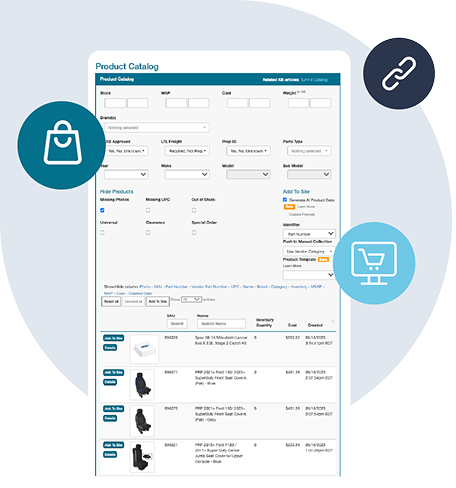
Nu-Tone Product Catalog Automation
The Spark Shipping Nu-Tone integration connects directly to the Nu-Tone API to keep WooCommerce updated with accurate product data, pricing, and availability.
You receive automatic updates for:
Product Attributes
- Product descriptions and specs
- UPC, MPN, and identifiers
- Category and brand data
High-Quality Images
- High-resolution images
- Multiple views when available
MAP Pricing and Availability
- MAP-compliant pricing
- Real-time stock levels
- Low stock and out-of-stock updates
Fast Publishing
New Nu-Tone products appear in your dashboard and can be published quickly with complete data.
This gives you a clean, accurate, and always up-to-date Nu-Tone catalog without manual work, supported entirely through the Nu-Tone API.
Want to Find Out More?
Technical Specifications
Synchronize Products
- Create Nu-Tone products in WooCommerce
- Show Nu-Tone products not currently in WooCommerce
- Learn more about Full Product Data Upload
Update Inventory
- Get inventory quantity updates from Nu-Tone
- Update the quantities in WooCommerce
Send Orders
- Get new orders from WooCommerce
- Send order fulfillment requests to Nu-Tone
Update Tracking
- Get tracking updates from Nu-Tone
- Send shipment data to WooCommerce
- Your cart will notify the buyer that their item has shipped
Choose Your Path to Scale
Frequently Asked Questions
How do I connect Nu-Tone to WooCommerce?
Spark Shipping provides a pre-built integration between Nu-Tone and WooCommerce. To get started, create a Spark Shipping account, add Nu-Tone as a vendor using your API credentials or data feed details, then connect your WooCommerce store. Once linked, Spark Shipping handles product data, inventory, pricing, order routing, and tracking updates automatically — no custom development required.
Does Spark Shipping sync Nu-Tone inventory with WooCommerce automatically?
Yes. Spark Shipping pulls live inventory levels directly from Nu-Tone and pushes updates to your WooCommerce store on a scheduled interval. When a product goes out of stock or drops below a threshold you set, your WooCommerce listings update automatically to prevent overselling.
What Nu-Tone product data gets synced to WooCommerce?
Spark Shipping syncs the full Nu-Tone product catalog your dealer account is authorized for, including titles, descriptions, specifications, high-resolution images, UPCs, MPNs, brand and category data, and your dealer-specific pricing. All product data flows directly into your WooCommerce store and stays up to date automatically.
Can I automate Nu-Tone order fulfillment on WooCommerce?
Yes. When a customer places an order on your WooCommerce store, Spark Shipping captures it and submits a fulfillment request directly to Nu-Tone. Once Nu-Tone ships the order, tracking information is pulled back and pushed to WooCommerce automatically, so your customer receives a shipping notification without any manual work on your end.
Can I sell Nu-Tone products alongside other suppliers on WooCommerce?
Absolutely. Spark Shipping supports multiple vendors on a single WooCommerce store. If the same product is available from Nu-Tone and another supplier, you can link both to one listing. Spark Shipping's Intelligent Order Routing then automatically selects the supplier with the best price or closest warehouse to the customer's shipping address for each order.
How does Spark Shipping handle Nu-Tone pricing on WooCommerce?
Spark Shipping pulls your dealer cost and MAP pricing directly from Nu-Tone and applies your custom pricing rules to calculate retail prices on WooCommerce. You can set fixed dollar markups, percentage margins, or tiered pricing structures. When Nu-Tone changes wholesale cost or MAP, your WooCommerce prices adjust automatically to protect your margins.