
Need to integrate Kroll International with Amazon Seller Central?
- Want to integrate Kroll International with Amazon Seller Central?
- Are you spending hours keeping product listings updated?
- Is order tracking for your customers difficult?
Amazon Seller Central Integration Details
- Integration Method: API
- Setup Fee: Free
- Categories: Outdoors Firearms
- URL: https://www.krollcorp.com/
- Headquarters: Shelby Township


Trusted Automation for Fast-Growing eCommerce Brands





Instant Kroll International Integration & Automation
Product Data
- Load complete product listings with rich attributes.
Inventory and Pricing:
- Sync stock and pricing automatically.
- Maintain MAP compliance.
- Prevent overselling.
Orders and Tracking:
- Route orders directly to Kroll International.
- Receive tracking updates back to Amazon Seller Central automatically.
How to Connect Kroll International to Amazon Seller Central
- Log in to your vendor’s dealer portal and look for a section labeled API, Integrations, or Data Feeds. If unavailable, contact your vendor representative to request their API keys or FTP credentials.
- In your Spark Shipping dashboard, go to Vendors.
- Click Add Vendor, then select Kroll International from the list of integrations.
- Enter the credentials you retrieved in Step 1 (such as API Keys, FTP details, or Client IDs) into the corresponding fields.
- Click the Test Connection button to confirm that Spark Shipping can communicate with Kroll International’s system.
- Once validated, the connection is live. Spark Shipping will begin downloading the product catalog (the initial sync time varies by vendor).
- You can now configure your automation rules to automatically sync inventory, pricing, and route orders.














Case Study
-

"Choosing Spark Shipping was a game-changer for us at Juiced Accessories. Their ability to swiftly implement solutions made a significant impact."
-
"Since using Spark Shipping we have seen growth in sales and a reduction in time spent processing orders. Spark Shipping's inventory and ordering save us a lot of time and have brought us extra business opportunities with the inventory data."


Choose Your Path to Scale
Kroll International Integration Benefits

List Kroll International Products Fast
- Automatically update your site with available stock
- List thousands of products in seconds
- Update the latest prices
- Stay in MAP compliance
- Upload images and descriptions
- Include products from multiple suppliers
- Send orders directly to your distributor

Improve User Experience and Grow Kroll International Sales
- Connect your product catalog with customer-facing apps
- Maximize product choice for customers
- Allow users to search large product databases with ease
- Build trust with customers & elevate your brand

Automate Kroll International Tracking
- Automatically provide your distributors tracking updates to customers
- Save time dealing with customer tracking requests
- Improve customer experience
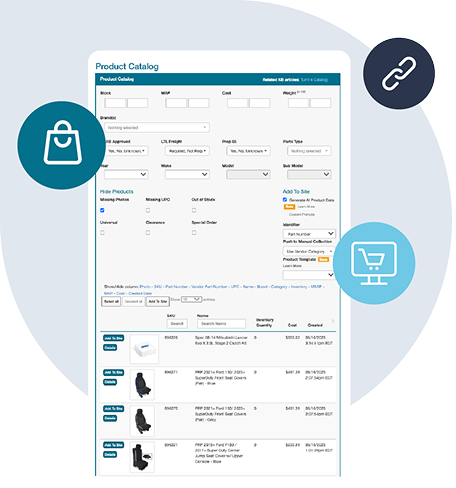
Kroll International Product Catalog Automation
The Spark Shipping Kroll International integration connects directly to the Kroll International API to keep Amazon Seller Central updated with accurate product data, pricing, and availability.
You receive automatic updates for:
Product Attributes
- Product descriptions and specs
- UPC, MPN, and identifiers
- Category and brand data
High-Quality Images
- High-resolution images
- Multiple views when available
MAP Pricing and Availability
- MAP-compliant pricing
- Real-time stock levels
- Low stock and out-of-stock updates
Fast Publishing
New Kroll International products appear in your dashboard and can be published quickly with complete data.
This gives you a clean, accurate, and always up-to-date Kroll International catalog without manual work, supported entirely through the Kroll International API.
Want to Find Out More?
Technical Specifications
Synchronize Products
- Create Kroll International products in Amazon Seller Central
- Show Kroll International products not currently in Amazon Seller Central
- Learn more about Full Product Data Upload
Update Inventory
- Get inventory quantity updates from Kroll International
- Update the quantities in Amazon Seller Central
Send Orders
- Get new orders from Amazon Seller Central
- Send order fulfillment requests to Kroll International
Update Tracking
- Get tracking updates from Kroll International
- Send shipment data to Amazon Seller Central
- Your cart will notify the buyer that their item has shipped
Choose Your Path to Scale
Frequently Asked Questions
How do I connect Kroll International to my Amazon Seller Central store?
To connect Kroll International to your Amazon Seller Central store, you need an approved Kroll dealer account and access to its API integration. That connection lets product information, stock, prices and orders move between the supplier account and your store. For customer-direct shipping, Kroll must also approve your account for its designated dropship program.
You can manage listings and supplier orders yourself or have a developer build and maintain the connection. Spark Shipping provides a ready-made Kroll integration for product data, stock, pricing, order submissions and tracking, reducing the routine work of keeping those systems in step.
Connect the store and supplier account, then import selected products or match the listings you already sell. Choose your stock and pricing rules, and enable automatic ordering once your account and delivery arrangement are approved for live orders.
Kroll carries tactical, public-safety and shooting-sports products, so choose a range your supplier agreement, sales channel and payment provider allow. An eBay connection, for example, does not permit firearms or firearm ammunition.
For platform-specific details, see the Kroll International integrations for Shopify, WooCommerce, BigCommerce, Amazon Seller Central, eBay.
What product information can I import from Kroll International to Amazon Seller Central?
You can import the Kroll International product information available to your account, including descriptions, images and product identifiers where supplied, along with stock quantities and dealer costs. Kroll's range spans tactical, public-safety and shooting-sports products; you choose which eligible items to sell.
Your team can prepare listings manually, or a developer can build and maintain a catalog connection. Spark Shipping downloads the available information and offers one-click product importing, helping you add selected products to your Amazon Seller Central store on supported sales channels without building every listing by hand.
Match items you already list to their supplier products instead of importing duplicates. The supplier data, your account permissions and the channel's listing requirements determine what you can publish.
How do I sync Kroll International inventory with my Amazon Seller Central store and avoid overselling?
Inventory syncing keeps the quantities shown in your Amazon Seller Central store aligned with stock available from Kroll International. It needs an ongoing connection that receives supplier stock updates and applies them to the matching listings.
You can check stock and edit quantities by hand, or ask a developer to create a stock connection and keep it working. Spark Shipping handles the recurring updates automatically, reducing those repeated checks and edits. Match each listing to the right supplier product, including whether you sell one item or a pack, so stock updates apply correctly.
You can also set a low-stock cutoff, so products show as unavailable when supplier stock falls below your chosen threshold. Stock can change between updates, so syncing reduces overselling risk without eliminating it. See minimum-quantity settings.
How do I automate price updates for Kroll International products on Amazon Seller Central?
To automate selling prices for Kroll International products, your Amazon Seller Central store first needs a connection that receives Kroll's dealer-cost updates. Pricing rules can then calculate selling prices from those costs, with room for your margin, delivery charges and selling fees.
You could ask a developer to create that connection and handle its upkeep. Spark Shipping provides it ready-made and, once pricing automation is enabled, applies your markup rules as new supplier costs arrive. This replaces repeated cost checks and manual price changes.
If you use Kroll's designated dropship program, allow for its agreed freight charges rather than assuming standard-order shipping applies. Where minimum advertised price (MAP) data is supplied, choose the relevant settings and follow the brand's current policy. See automated price updates.
How do I send orders from my Amazon Seller Central store to Kroll International automatically?
Automatic ordering needs a connection between your Amazon Seller Central store and the Kroll International account approved to fulfill those orders. Match each listing to the right supplier product, variant and quantity, and confirm whether the order is going to your business or through Kroll's approved dropship arrangement.
Your team can enter supplier orders manually, or a developer can build and maintain an ordering connection. With the approved account connected and automatic ordering enabled, Spark Shipping sends the eligible items assigned to Kroll, reducing duplicate order entry as sales grow.
Only send products allowed by your supplier agreement and sales channel. For firearm orders on channels that permit them, confirm the receiving licensed dealer and required FFL information, including the license number and expiration date, before enabling that workflow. The FFL order guide explains the information Spark Shipping needs.
How do I sync Kroll International tracking updates back to my Amazon Seller Central store?
Tracking sync returns shipment details from Kroll International to the matching orders in your Amazon Seller Central store after the supplier ships and provides tracking.
You can copy those details into the store yourself, or ask a developer to set up and maintain a tracking connection. Spark Shipping collects the available tracking and adds it to the matching orders automatically, saving you from looking up and updating each shipment by hand.
Your sales channel's notification settings determine how customers receive shipping messages. See automated tracking updates.
How do I sell Kroll International products on Amazon Seller Central alongside other suppliers and stock in my own store or warehouse?
To sell products from Kroll International and other suppliers alongside your own stock, connect each source to your Amazon Seller Central store and match the same item to one listing. Make sure the product, variant and pack size match across those sources.
You could coordinate fulfillment by hand, or have a developer build and maintain a system that connects your stock sources. Spark Shipping brings them into one setup and routes orders using your chosen rules, reducing the work of dividing and forwarding orders yourself.
Your rules can prioritize stock in your own store or warehouse, or choose between suppliers based on cost or a priority list. Set the stock and backorder preferences to suit how you sell, and use sources approved to fulfill the products and destinations involved. See order-routing options.
Can I dropship Kroll International products from my Amazon Seller Central store?
Yes, if Kroll International approves your ecommerce account for its designated dropship program and the products you want to sell. Kroll vets these accounts and has separate charges for dropship orders. Confirm the arrangement and charges for your account before offering it to customers.
You can place supplier orders manually under the same account, product and delivery restrictions. Once your Amazon Seller Central store is connected to the approved account for ordering, Spark Shipping can send eligible order items and return available tracking, saving you from placing each supplier order and copying shipment details yourself.
Allow for those charges when choosing your selling prices. See Kroll's shipping and dropship guidance.
Can I connect Kroll International to products already listed in my Amazon Seller Central store?
Yes. Existing products in your Amazon Seller Central store can be matched to Kroll International without replacing the listings or changing your store's product codes.
Spark Shipping links each store product to the code Kroll uses for the same item. Match the exact variant and pack size, especially where similar product names cover different sizes or packs. With the supplier connection in place, Spark Shipping can update quantities, apply enabled pricing rules and send assigned orders against those matches.
This lets you add supplier automation behind the catalog you already sell. See matching existing products.