
Need to integrate Keystone Automotive with WooCommerce?
- Want to integrate Keystone Automotive with WooCommerce?
- Are you spending hours keeping product listings updated?
- Is order tracking for your customers difficult?
WooCommerce Integration Details
- Integration Method: API
- Setup Fee: Free
- Categories: Automotive
- URL: https://www.keystoneautomotive.com/
- Headquarters: Exeter, PA


Keystone Automotive is one of the largest distributors of aftermarket automotive parts, accessories, and collision repair components in North America. A subsidiary of LKQ Corporation (NASDAQ: LKQ), Keystone Automotive operates a vast network of distribution centers across the United States and Canada, providing next-day delivery to most markets. Keystone Automotive has built a reputation for deep inventory, fast fulfillment, and an extensive catalog that serves collision repair shops, auto parts retailers, and ecommerce sellers.
The Keystone Automotive parts catalog includes bumpers, fenders, hoods, headlights, mirrors, grilles, wheels, and a wide range of aftermarket collision and mechanical components. Beyond body parts, Keystone Automotive also distributes performance accessories, truck accessories, and specialty automotive products from hundreds of manufacturers. This makes Keystone Automotive parts a primary sourcing channel for retailers who need reliable fitment data, competitive wholesale pricing, and broad SKU coverage across virtually every vehicle make and model.
Authorized buyers access the full Keystone Automotive catalog, look up fitment data, and place orders through keystoneautomotive.com. With Spark Shipping’s Keystone Automotive integration, your auto parts ecommerce store connects directly to the Keystone product feed — automating product data imports, real-time inventory synchronization, pricing updates, and order routing without needing to manually check keystoneautomotive.com for availability throughout the day.
Trusted Automation for Fast-Growing eCommerce Brands





Instant Keystone Automotive Integration & Automation
Product Data
- Load complete product listings with rich attributes.
Inventory and Pricing:
- Sync stock and pricing automatically.
- Maintain MAP compliance.
- Prevent overselling.
Orders and Tracking:
- Route orders directly to Keystone Automotive.
- Receive tracking updates back to WooCommerce automatically.
How to Connect Keystone Automotive to WooCommerce
- Log in to your vendor’s dealer portal and look for a section labeled API, Integrations, or Data Feeds. If unavailable, contact your vendor representative to request their API keys or FTP credentials.
- In your Spark Shipping dashboard, go to Vendors.
- Click Add Vendor, then select Keystone Automotive from the list of integrations.
- Enter the credentials you retrieved in Step 1 (such as API Keys, FTP details, or Client IDs) into the corresponding fields.
- Click the Test Connection button to confirm that Spark Shipping can communicate with Keystone Automotive’s system.
- Once validated, the connection is live. Spark Shipping will begin downloading the product catalog (the initial sync time varies by vendor).
- You can now configure your automation rules to automatically sync inventory, pricing, and route orders.

-1.webp)


-1.webp)








%20(1)-1-1.webp?width=200&name=weapon-depot-logo%20(1)%20(1)-1-1.webp)
Case Study
-

"Choosing Spark Shipping was a game-changer for us at Juiced Accessories. Their ability to swiftly implement solutions made a significant impact."
-
"Since using Spark Shipping we have seen growth in sales and a reduction in time spent processing orders. Spark Shipping's inventory and ordering save us a lot of time and have brought us extra business opportunities with the inventory data."


Choose Your Path to Scale
Keystone Automotive Integration Benefits

List Keystone Automotive Products Fast
- Automatically update your site with available stock
- List thousands of products in seconds
- Update the latest prices
- Stay in MAP compliance
- Include products from multiple suppliers
- Send orders directly to your distributor
Improve User Experience and Grow Keystone Automotive Sales
- Connect your product catalog with customer-facing apps
- Maximize product choice for customers
- Allow users to search large product databases with ease
- Build trust with customers & elevate your brand

Automate Keystone Automotive Tracking
- Automatically provide your distributors tracking updates to customers
- Save time dealing with customer tracking requests
- Improve customer experience
Keystone Automotive Product Catalog Automation
The Spark Shipping Keystone Automotive integration connects directly to the Keystone Automotive API to keep WooCommerce updated with accurate product data, pricing, and availability.
You receive automatic updates for:
Product Attributes
- Product descriptions and specs
- UPC, MPN, and identifiers
- Category and brand data
MAP Pricing and Availability
- MAP-compliant pricing
- Real-time stock levels
- Low stock and out-of-stock updates
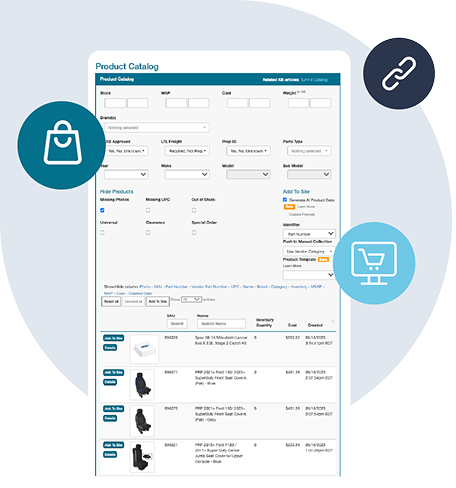
Fast Publishing
New Keystone Automotive products appear in your dashboard and can be published quickly with complete data.
This gives you a clean, accurate, and always up-to-date Keystone Automotive catalog without manual work, supported entirely through the Keystone Automotive API.
Want to Find Out More?
Technical Specifications
Synchronize Products
- Create Keystone Automotive products in WooCommerce
- Show Keystone Automotive products not currently in WooCommerce
- Learn more about Full Product Data Upload
Update Inventory
- Get inventory quantity updates from Keystone Automotive
- Update the quantities in WooCommerce
Send Orders
- Get new orders from WooCommerce
- Send order fulfillment requests to Keystone Automotive
Update Tracking
- Get tracking updates from Keystone Automotive
- Send shipment data to WooCommerce
- Your cart will notify the buyer that their item has shipped
Choose Your Path to Scale
Frequently Asked Questions
Can you give me more information about Keystone Automotive?
Keystone Automotive is one of the largest distributors of aftermarket automotive parts, accessories, and collision repair components in North America. A subsidiary of LKQ Corporation (NASDAQ: LKQ), Keystone Automotive operates a vast network of distribution centers across the United States and Canada, providing next-day delivery to most markets. Keystone Automotive has built a reputation for deep inventory, fast fulfillment, and an extensive catalog that serves collision repair shops, auto parts retailers, and ecommerce sellers.
The Keystone Automotive parts catalog includes bumpers, fenders, hoods, headlights, mirrors, grilles, wheels, and a wide range of aftermarket collision and mechanical components. Beyond body parts, Keystone Automotive also distributes performance accessories, truck accessories, and specialty automotive products from hundreds of manufacturers. This makes Keystone Automotive parts a primary sourcing channel for retailers who need reliable fitment data, competitive wholesale pricing, and broad SKU coverage across virtually every vehicle make and model.
Authorized buyers access the full Keystone Automotive catalog, look up fitment data, and place orders through keystoneautomotive.com. With Spark Shipping’s Keystone Automotive integration, your auto parts ecommerce store connects directly to the Keystone product feed — automating product data imports, real-time inventory synchronization, pricing updates, and order routing without needing to manually check keystoneautomotive.com for availability throughout the day.
- URL: https://www.keystoneautomotive.com/
- Headquarters: Exeter, PA
- Category: Automotive
How do I connect Keystone Automotive to my WooCommerce store?
You can connect Keystone Automotive to your WooCommerce store using a ready-made integration or a connection built by your developer. You will need an active Keystone dealer account, FTP credentials for product and inventory files, and API credentials for the services you want to automate, including ordering.
Managing product updates and supplier orders manually takes ongoing work. A custom connection can automate those tasks, but your developer needs to maintain it. Spark Shipping's Keystone Automotive integration automates product information, stock, pricing, orders and tracking, reducing repeated data entry and order handling.
To get started, connect your store in Spark Shipping, add your Keystone account credentials, and choose products to add or match to existing listings. Set your stock, pricing and fulfillment preferences, with the required supplier access in place before enabling live orders.
For platform-specific details, see the Keystone Automotive integrations for Shopify, WooCommerce, BigCommerce, Amazon Seller Central and eBay.
See the Keystone connection guide for setup details.
What product information can I import from Keystone Automotive to WooCommerce?
You can bring Keystone Automotive's product records, stock availability and dealer pricing into your WooCommerce store. For richer listings, Spark Shipping can supplement the basic supplier data with descriptions, images and available vehicle-fitment information from SEMA Data. Your SEMA Data plan needs to include API access, and the brands you sell need to approve your data access.
You could prepare and import product files yourself, or maintain a custom catalog connection. Spark Shipping downloads the available information and offers one-click product importing, so you can select products and add them to your WooCommerce store on supported sales channels without creating each listing manually. Publishing options follow your storefront or marketplace's listing requirements.
For products already in your store, match the supplier records to those listings instead of importing duplicates. See publishing products from the catalog.
How do I sync Keystone Automotive inventory with my WooCommerce store and avoid overselling?
Inventory syncing keeps the stock shown in your WooCommerce store aligned with the quantities available from Keystone Automotive. It requires an ongoing connection that receives supplier stock updates and applies them to the matching listings.
Spark Shipping's Keystone integration offers inventory checks through the API as an alternative to batch-file updates. This can provide faster stock checks; choosing the appropriate inventory country also helps your listings reflect stock relevant to your fulfillment setup.
Spark Shipping updates the matching store quantities automatically, reducing repeated stock checks and listing edits. You can set a low-stock cutoff so fast-moving products show as unavailable when supplier stock falls below your chosen threshold.
Stock can change between updates, so syncing reduces overselling risk without eliminating it. See the Keystone inventory options and minimum-quantity settings.
How do I automate price updates for Keystone Automotive products on WooCommerce?
Automatic price updates require a connection between Keystone Automotive and your WooCommerce store that receives supplier cost changes. Once that is in place, pricing rules can calculate your selling prices from those costs, allowing for your margin, shipping and sales-channel fees.
Once pricing automation is enabled, Spark Shipping applies the rules you choose and updates prices as new supplier costs arrive, saving you from recalculating and editing each listing yourself. You can use percentage, fixed-amount or tiered markup rules.
Spark Shipping can also take minimum advertised price (MAP) information from Keystone's inventory file when that option is enabled. Use the supplied MAP information alongside your pricing rules and follow each brand's policy.
How do I send orders from my WooCommerce store to Keystone Automotive automatically?
To send orders to Keystone Automotive automatically, connect your WooCommerce store to your Keystone dealer account for ordering. Your account needs live-order access, and each store listing must be matched to the correct supplier product so orders contain the right items, quantities and delivery details.
You can enter orders through the supplier's tools yourself, or maintain a custom ordering connection. Spark Shipping sends the order items assigned to Keystone Automotive, saving you from entering the same purchase again in the supplier's system.
If you use several suppliers or fulfill some items yourself, your routing preferences determine which source receives each item. See how order routing connects customer orders with their fulfillment source.
How do I sync Keystone Automotive tracking updates back to my WooCommerce store?
Tracking sync brings shipment information from Keystone Automotive back to the corresponding order in your WooCommerce store after the supplier ships and provides tracking.
Spark Shipping collects the supplied tracking details and returns them to the matching store order, removing the need to look up and copy each tracking number yourself. Your sales channel can then use that information in customer shipment updates according to its notification settings.
See how tracking automation completes the supplier-to-store order journey.
How do I sell Keystone Automotive products on WooCommerce alongside other suppliers and stock in my own store or warehouse?
The same part may be available from Keystone Automotive, another supplier and stock in your own store or warehouse. To sell those sources through your WooCommerce store, connect their inventory and match the identical products to the same listing, including the correct variant and pack quantity.
You can then decide which source should fulfill each order item. Spark Shipping brings the connected sources together and routes items to the selected supplier or your own shipping team, reducing the work of splitting and forwarding orders yourself. Your fulfillment preferences can account for source priority, available stock, cost or delivery location.
See how order routing coordinates multiple fulfillment sources.
How do I help shoppers find Keystone Automotive parts that fit their vehicle in my WooCommerce store?
Helping shoppers find parts that fit their vehicle requires both compatibility information for the products and a way to search or display that information in your WooCommerce store.
For Keystone Automotive, Spark Shipping can obtain available fitment information through SEMA Data enrichment if your SEMA Data reseller plan includes API access and you have data approval for the brands you sell. This saves you from collecting compatibility details product by product.
For your own storefront, you can use the available data in product information or export it for a compatible year/make/model search tool. That tool controls how shoppers search by vehicle. On marketplaces such as Amazon and eBay, compatibility information follows the channel's listing requirements.
See the SEMA enrichment guide and ways to use fitment data.
Can I connect Keystone Automotive to products already listed in my WooCommerce store?
Yes. You can connect Keystone Automotive to existing listings in your WooCommerce store without rebuilding your catalog or importing duplicate products.
Match each store SKU to the corresponding Keystone product code. The codes can differ, as long as the match identifies the exact product, variant and pack quantity you sell.
Spark Shipping supports SKU mapping, including bulk mapping for larger catalogs. Once the connection is set up and your products are matched, it can update stock, apply your enabled pricing rules and send the relevant orders to Keystone. You keep the catalog you already sell while adding supplier automation behind it.
Can I use Keystone Automotive Canadian inventory in my WooCommerce store?
Spark Shipping's Keystone Automotive integration lets you choose which country's inventory is used for availability. If you select Canadian inventory, the quantities are combined across Keystone's Canadian warehouses.
This helps your WooCommerce store show stock from the country you plan to source from. Choose the inventory country that fits your dealer account and fulfillment arrangement, then match the supplier products to your listings so Spark Shipping can update their quantities automatically.
Your dealer terms still determine where you can sell and ship. Order routing is set up separately from the stock shown in your store.
See the Keystone inventory options.