
Need to integrate Ingram Micro with Shopify?
- Want to integrate Ingram Micro with Shopify?
- Are you spending hours keeping product listings updated?
- Is order tracking for your customers difficult?
Shopify Integration Details
- Integration Method: API
- Setup Fee: Free
- Categories: Consumer Electronics Ink and Toner
- URL: https://www.ingrammicro.com/
- Headquarters: Irvine, CA


Ingram Micro is the world's largest technology distributor by revenue, moving over $50 billion in IT products and services annually. Founded in 1979 and headquartered in Irvine, California, the company operates in more than 55 countries and reaches nearly 90 percent of the global population through its distribution network.
For ecommerce resellers, Ingram Micro is a critical supply chain partner. Their catalog spans hundreds of thousands of SKUs across consumer electronics, networking equipment, cloud infrastructure, security solutions, computing hardware, displays, peripherals, software, and professional services. Whether you sell laptops, servers, networking gear, or point-of-sale systems, Ingram Micro likely carries the brands your customers are searching for — including HP, Cisco, Microsoft, Apple, Lenovo, Samsung, and hundreds more.
Ingram Micro provides authorized resellers with dealer-specific pricing, real-time inventory visibility across their warehouse network, MAP pricing enforcement, and direct order fulfillment. Their API gives integration partners like Spark Shipping programmatic access to this data, enabling automated catalog management, inventory synchronization, order submission, and shipment tracking without manual intervention. For dropshippers and multi-channel sellers, this means you can list, sell, and fulfill Ingram Micro products across Shopify, Amazon, eBay, BigCommerce, and other platforms — all powered by a single API connection through Spark Shipping.
Trusted Automation for Fast-Growing eCommerce Brands





Instant Ingram Micro Integration & Automation
Product Data
- Load complete product listings with rich attributes.
Inventory and Pricing:
- Sync stock and pricing automatically.
- Maintain MAP compliance.
- Prevent overselling.
Orders and Tracking:
- Route orders directly to Ingram Micro.
- Receive tracking updates back to Shopify automatically.
How to Connect Ingram Micro to Shopify
- Log in to your vendor’s dealer portal and look for a section labeled API, Integrations, or Data Feeds. If unavailable, contact your vendor representative to request their API keys or FTP credentials.
- In your Spark Shipping dashboard, go to Vendors.
- Click Add Vendor, then select Ingram Micro from the list of integrations.
- Enter the credentials you retrieved in Step 1 (such as API Keys, FTP details, or Client IDs) into the corresponding fields.
- Click the Test Connection button to confirm that Spark Shipping can communicate with Ingram Micro’s system.
- Once validated, the connection is live. Spark Shipping will begin downloading the product catalog (the initial sync time varies by vendor).
- You can now configure your automation rules to automatically sync inventory, pricing, and route orders.














Case Study
-

"Choosing Spark Shipping was a game-changer for us at Juiced Accessories. Their ability to swiftly implement solutions made a significant impact."
-
"Since using Spark Shipping we have seen growth in sales and a reduction in time spent processing orders. Spark Shipping's inventory and ordering save us a lot of time and have brought us extra business opportunities with the inventory data."


Choose Your Path to Scale
Ingram Micro Integration Benefits

List Ingram Micro Products Fast
- Automatically update your site with available stock
- List thousands of products in seconds
- Update the latest prices
- Stay in MAP compliance
- Include products from multiple suppliers
- Send orders directly to your distributor

Improve User Experience and Grow Ingram Micro Sales
- Connect your product catalog with customer-facing apps
- Maximize product choice for customers
- Allow users to search large product databases with ease
- Build trust with customers & elevate your brand

Automate Ingram Micro Tracking
- Automatically provide your distributors tracking updates to customers
- Save time dealing with customer tracking requests
- Improve customer experience
Ingram Micro Product Catalog Automation
The Spark Shipping Ingram Micro integration connects directly to the Ingram Micro API to keep Shopify updated with accurate product data, pricing, and availability.
You receive automatic updates for:
Product Attributes
- Product descriptions and specs
- UPC, MPN, and identifiers
- Category and brand data
MAP Pricing and Availability
- MAP-compliant pricing
- Real-time stock levels
- Low stock and out-of-stock updates
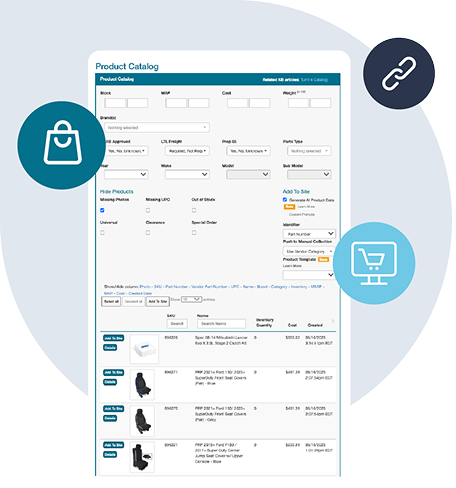
Fast Publishing
New Ingram Micro products appear in your dashboard and can be published quickly with complete data.
This gives you a clean, accurate, and always up-to-date Ingram Micro catalog without manual work, supported entirely through the Ingram Micro API.
Ingram Micro API Integration — No Code Required
Connecting to the Ingram Micro API on your own means building and maintaining custom code to handle authentication, catalog downloads, inventory polling, order submission, and tracking retrieval. For most ecommerce teams, that is months of developer time and an ongoing maintenance burden every time Ingram Micro updates their API endpoints or data formats.
Spark Shipping eliminates that entirely. Our pre-built Ingram Micro API integration handles the full technical handshake so you never write a line of code. Once you enter your Ingram Micro API credentials, Spark Shipping establishes a persistent, authenticated connection and begins syncing your authorized product catalog, real-time inventory levels, dealer pricing, and order data automatically.
Because the integration is API-native rather than file-based, every data exchange happens in near real time. Inventory counts reflect what Ingram Micro has on the shelf right now — not what a nightly feed said hours ago. Orders are submitted the moment they arrive in your store, and tracking numbers flow back as soon as Ingram Micro generates them. The result is fewer oversells, faster fulfillment, and less time spent babysitting spreadsheets.

Automate Ingram Micro Dropshipping from End to End
Dropshipping with Ingram Micro gives you access to one of the world's largest technology product catalogs without holding inventory. The challenge is operational: keeping thousands of SKUs accurate across your store, routing orders to the right Ingram Micro warehouse, and getting tracking numbers back to customers before they open a support ticket.
Spark Shipping automates every stage of the Ingram Micro dropshipping workflow. Product listings are created and enriched automatically using data pulled from the Ingram Micro API, including titles, descriptions, images, UPCs, and category attributes. Inventory and pricing sync on a continuous schedule so your store never advertises a product Ingram Micro can't ship. When an order comes in, Spark Shipping submits the fulfillment request directly to Ingram Micro and monitors for tracking updates, pushing shipment details back to your storefront and notifying your customer automatically.
If you sell products from multiple suppliers alongside Ingram Micro, Spark Shipping's Intelligent Order Routing compares price and warehouse proximity across all of your connected vendors and selects the best fulfillment option for every order. That means lower shipping costs, faster delivery times, and healthier margins — all without manual intervention.

Sell Ingram Micro Products Across Every Sales Channel
Most resellers sell on more than one platform. The problem is that each sales channel typically requires its own integration — separate inventory feeds, separate order workflows, and separate tracking pipelines. Multiply that by the number of suppliers you work with and the operational overhead becomes unmanageable.
Spark Shipping solves this with a single Ingram Micro integration that powers every storefront you connect. Your Ingram Micro product catalog, inventory levels, and dealer pricing push out to all of your sales channels simultaneously, and incoming orders from any channel route back to Ingram Micro through one unified workflow. There is no per-platform setup, no duplicate configuration, and no middleware to maintain.
Adding a new sales channel takes minutes, not weeks. Connect a new storefront, map it to your existing Ingram Micro catalog inside Spark Shipping, and you are live — with full inventory sync, automated order routing, and tracking updates from day one. As your business grows into new channels, the Ingram Micro integration scales with you without adding operational complexity or requiring additional development.

Want to Find Out More?
Technical Specifications
Synchronize Products
- Create Ingram Micro products in Shopify
- Show Ingram Micro products not currently in Shopify
- Learn more about Full Product Data Upload
Update Inventory
- Get inventory quantity updates from Ingram Micro
- Update the quantities in Shopify
Send Orders
- Get new orders from Shopify
- Send order fulfillment requests to Ingram Micro
Update Tracking
- Get tracking updates from Ingram Micro
- Send shipment data to Shopify
- Your cart will notify the buyer that their item has shipped
Choose Your Path to Scale
Frequently Asked Questions
Can you give me more information about Ingram Micro?
Ingram Micro is the world's largest technology distributor by revenue, moving over $50 billion in IT products and services annually. Founded in 1979 and headquartered in Irvine, California, the company operates in more than 55 countries and reaches nearly 90 percent of the global population through its distribution network.
For ecommerce resellers, Ingram Micro is a critical supply chain partner. Their catalog spans hundreds of thousands of SKUs across consumer electronics, networking equipment, cloud infrastructure, security solutions, computing hardware, displays, peripherals, software, and professional services. Whether you sell laptops, servers, networking gear, or point-of-sale systems, Ingram Micro likely carries the brands your customers are searching for — including HP, Cisco, Microsoft, Apple, Lenovo, Samsung, and hundreds more.
Ingram Micro provides authorized resellers with dealer-specific pricing, real-time inventory visibility across their warehouse network, MAP pricing enforcement, and direct order fulfillment. Their API gives integration partners like Spark Shipping programmatic access to this data, enabling automated catalog management, inventory synchronization, order submission, and shipment tracking without manual intervention. For dropshippers and multi-channel sellers, this means you can list, sell, and fulfill Ingram Micro products across Shopify, Amazon, eBay, BigCommerce, and other platforms — all powered by a single API connection through Spark Shipping.
- URL: https://www.ingrammicro.com/
- Headquarters: Irvine, CA
- Category: Consumer Electronics
How do I connect Ingram Micro to my Shopify store?
To connect Ingram Micro to your Shopify store, start with an active reseller account and approval for the data and ordering services you need. You can use an integration service or have a developer build and maintain a connection.
Spark Shipping's Ingram Micro integration needs API credentials and FTP access to load and update the catalog. Rich descriptions, images and specifications are available through a separate Etilize subscription.
With your store and supplier account connected, Spark Shipping can keep stock and prices updated, send orders and bring tracking details back to your store. You can import selected products or connect the ones you already sell, saving you from repeatedly updating listings and entering supplier orders. Pricing and ordering run according to the rules and automations you enable, with supplier approval required before sending orders.
For platform-specific details, see the Ingram Micro integrations for Shopify, WooCommerce, BigCommerce, Amazon Seller Central and eBay.
What product information can I import from Ingram Micro to Shopify?
You can bring Ingram Micro product codes, dealer costs and stock information into your Shopify store. Rich descriptions, images and technical specifications can come from Etilize through a separate subscription, with coverage varying by product.
Once that content is connected, Spark Shipping offers one-click product importing on supported sales channels, so you can add selected products without writing each listing yourself.
For items already in your store, match the supplier products to existing listings rather than importing duplicates. You can also prepare listings using product information you have permission to use.
How do I sync Ingram Micro inventory with my Shopify store and avoid overselling?
Syncing Ingram Micro inventory means keeping your Shopify store's quantities linked to current supplier availability. The connection must receive updated stock and match it to the correct products; importing a catalog once will not keep those quantities current.
Spark Shipping checks the connected supplier stock and updates the matching listings automatically. You can set a low-stock cutoff to stop offering an item when supplier stock falls below your chosen threshold, reducing the need to check availability and edit quantities yourself.
Updates depend on the supplier feed and your sales channel, so stock can still change between checks. Syncing reduces overselling risk without eliminating it. See inventory synchronization and minimum-quantity settings.
How do I automate price updates for Ingram Micro products on Shopify?
To automate Ingram Micro price updates, first connect its cost information to your Shopify store through an integration. Pricing rules can then turn those costs into selling prices, allowing for your margin, shipping and sales-channel fees.
With pricing automation enabled, Spark Shipping applies your percentage, fixed-amount or tiered markup rules as updated costs arrive. That saves you from checking supplier price changes and recalculating each listing yourself.
If your supplier feed includes minimum advertised prices (MAP), you can use them in your pricing rules alongside the brand's current policy. Availability varies by product. See automated price updates.
How do I send orders from my Shopify store to Ingram Micro automatically?
To send orders automatically, connect your Shopify store to your Ingram Micro account and get approval to place orders through that connection. Match your listings to the right supplier products. The connection needs to pass each item's product code, quantity and delivery information to the supplier.
Once that is ready and automatic ordering is enabled, Spark Shipping sends the items you route to Ingram Micro. You avoid entering the same purchase in both your store and the supplier's system.
You can instead place orders through the supplier's tools or build and maintain an ordering connection yourself. Ask Ingram Micro for approval to place orders as well as access to the catalog. See order routing.
How do I sync Ingram Micro tracking updates back to my Shopify store?
Tracking updates need a connection that brings shipment details from Ingram Micro back to your Shopify store. After the supplier ships an order and provides shipment details, those details must be matched to the original customer order.
Spark Shipping collects the available tracking information and adds it to the matching store order, saving you from looking up shipments and copying tracking numbers yourself. Your store can then use those details in its shipping notifications, depending on your settings.
How do I sell Ingram Micro products on Shopify alongside other suppliers and stock in my own store or warehouse?
You can sell Ingram Micro products through your Shopify store alongside other suppliers and stock in your own store or warehouse. Each product needs to be linked to the right item at each supplier, checking that the exact model and quantity match.
You can then decide who should ship each order—for example, using your own stock first and a supplier when it runs out. Spark Shipping sends the order items to the supplier or your own shipping team according to your rules, saving you from splitting and forwarding orders manually.
Those rules can account for available stock, which supplier you prefer and where the order needs to go. See choosing an order-routing rule.
How do I add descriptions, images and specifications to Ingram Micro products in my Shopify store?
To add descriptions, images and specifications to Ingram Micro products, you need a source for that content alongside the supplier's pricing and stock information. A pricing file identifies the products and what they cost, but does not provide everything you need for a useful listing.
Spark Shipping combines the supplier's pricing file with available Etilize product content to build a catalog for your Shopify store. This saves you from researching and writing every listing yourself.
Etilize requires a separate subscription. Check that it covers the brands and products you want to sell before subscribing, then connect the content through Spark Shipping. Review the listings for any details your sales channel still needs. Manufacturer content or your own descriptions are other options where you have permission to use them.