
Need to integrate Hanson Distributing with eBay?
- Want to integrate Hanson Distributing with eBay?
- Are you spending hours keeping product listings updated?
- Is order tracking for your customers difficult?
eBay Integration Details
- Integration Method: API
- Setup Fee: Free
- Categories: Automotive
- URL: https://hansondc.com/
- Headquarters:


Trusted Automation for Fast-Growing eCommerce Brands





Instant Hanson Distributing Integration & Automation
Product Data
- Load complete product listings with rich attributes.
Inventory and Pricing:
- Sync stock and pricing automatically.
- Maintain MAP compliance.
- Prevent overselling.
Orders and Tracking:
- Route orders directly to Hanson Distributing.
- Receive tracking updates back to eBay automatically.
How to Connect Hanson Distributing to eBay
- Log in to your vendor’s dealer portal and look for a section labeled API, Integrations, or Data Feeds. If unavailable, contact your vendor representative to request their API keys or FTP credentials.
- In your Spark Shipping dashboard, go to Vendors.
- Click Add Vendor, then select Hanson Distributing from the list of integrations.
- Enter the credentials you retrieved in Step 1 (such as API Keys, FTP details, or Client IDs) into the corresponding fields.
- Click the Test Connection button to confirm that Spark Shipping can communicate with Hanson Distributing’s system.
- Once validated, the connection is live. Spark Shipping will begin downloading the product catalog (the initial sync time varies by vendor).
- You can now configure your automation rules to automatically sync inventory, pricing, and route orders.

-1.webp)


-1.webp)








%20(1)-1-1.webp?width=200&name=weapon-depot-logo%20(1)%20(1)-1-1.webp)
Case Study
-

"Choosing Spark Shipping was a game-changer for us at Juiced Accessories. Their ability to swiftly implement solutions made a significant impact."
-
"Since using Spark Shipping we have seen growth in sales and a reduction in time spent processing orders. Spark Shipping's inventory and ordering save us a lot of time and have brought us extra business opportunities with the inventory data."


Choose Your Path to Scale
Hanson Distributing Integration Benefits

List Hanson Distributing Products Fast
- Automatically update your site with available stock
- List thousands of products in seconds
- Update the latest prices
- Stay in MAP compliance
- Upload images and descriptions
- Include products from multiple suppliers
- Send orders directly to your distributor

Improve User Experience and Grow Hanson Distributing Sales
- Connect your product catalog with customer-facing apps
- Maximize product choice for customers
- Allow users to search large product databases with ease
- Build trust with customers & elevate your brand

Automate Hanson Distributing Tracking
- Automatically provide your distributors tracking updates to customers
- Save time dealing with customer tracking requests
- Improve customer experience
Hanson Distributing Product Catalog Automation
The Spark Shipping Hanson Distributing integration connects directly to the Hanson Distributing API to keep eBay updated with accurate product data, pricing, and availability.
You receive automatic updates for:
Product Attributes
- Product descriptions and specs
- UPC, MPN, and identifiers
- Category and brand data
High-Quality Images
- High-resolution images
- Multiple views when available
MAP Pricing and Availability
- MAP-compliant pricing
- Real-time stock levels
- Low stock and out-of-stock updates
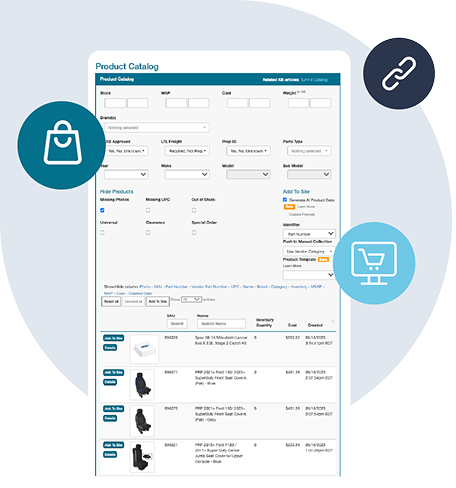
Fast Publishing
New Hanson Distributing products appear in your dashboard and can be published quickly with complete data.
This gives you a clean, accurate, and always up-to-date Hanson Distributing catalog without manual work, supported entirely through the Hanson Distributing API.
Want to Find Out More?
Technical Specifications
Synchronize Products
- Create Hanson Distributing products in eBay
- Show Hanson Distributing products not currently in eBay
- Learn more about Full Product Data Upload
Update Inventory
- Get inventory quantity updates from Hanson Distributing
- Update the quantities in eBay
Send Orders
- Get new orders from eBay
- Send order fulfillment requests to Hanson Distributing
Update Tracking
- Get tracking updates from Hanson Distributing
- Send shipment data to eBay
- Your cart will notify the buyer that their item has shipped
Choose Your Path to Scale
Frequently Asked Questions
How do I connect Hanson Distributing to my eBay store?
Connecting Hanson Distributing to your eBay store lets you bring in product information, keep stock and prices updated, and send customer orders to the supplier. You will need a supplier account and permission to use the services you want to automate.
Spark Shipping automates these tasks so you spend less time copying information and placing orders yourself. Connect your eBay store, add Hanson Distributing, then choose products to add or match the supplier’s products to listings already in your eBay store.
You can also have a developer build a connection using the supplier’s API or data files, but you or your developer will need to maintain it.
Before switching on automatic ordering, test an order and its tracking and complete any supplier approvals. Product information access and ordering permission may be separate. See supplier integration options.
What product information can I import from Hanson Distributing to eBay?
You can import the product details Hanson Distributing supplies, such as names, descriptions, images, specifications, product codes and prices. What you receive depends on the supplier and your account; some images or descriptions may require a separate content service or license.
Spark Shipping automatically downloads the available product information. You can then select the products you want and import them into your eBay store with one click, without building each listing manually.
This saves you from entering each listing manually and makes it easier to add a supplier’s range to your eBay store.
Alternatively, you can enter details yourself, import a product file or have a developer build and maintain a connection to the supplier.
Start with a small category and check sizes, product options and pack quantities. Match any products already listed so you do not create duplicates. See publishing products from the catalog.
How do I sync Hanson Distributing inventory with my eBay store and avoid overselling?
Keep your eBay store’s stock quantities updated from Hanson Distributing so customers see what the supplier has available. You can also hold back a small quantity from sale as a stock buffer to reduce the risk of selling items that have just run out.
Spark Shipping checks supplier stock on a schedule and automatically updates the matching products in your eBay store. Once you connect the eBay store and supplier, match your products and choose your stock settings, you no longer need to repeat those stock checks and edits manually.
You can update quantities yourself or build a connection to the supplier’s stock data, which you or your developer would maintain.
Check the warehouse locations included and test an out-of-stock product. Stock can change between updates, so automation reduces overselling risk without eliminating it completely. See inventory synchronization settings.
How do I automate price updates for Hanson Distributing products on eBay?
You can keep selling prices in line with Hanson Distributing cost changes by setting rules for how each cost becomes a retail price. Allow for delivery and selling fees when choosing your markup.
Spark Shipping automatically updates prices using supplier costs and the pricing rules you choose, so you don't have to check every cost change and recalculate prices yourself. Connect your eBay store and supplier, set your rules and check a few products before applying them more widely.
You can also calculate and edit prices manually or have a developer build and maintain a connection to the supplier’s price data.
If Hanson Distributing provides minimum advertised price (MAP) information, use the relevant pricing settings and check the brand’s policy. A price feed alone does not guarantee compliance. Review changes held for approval if that option applies. See store price update settings.
How do I send orders from my eBay store to Hanson Distributing automatically?
Automatic ordering sends customer purchases from your eBay store to Hanson Distributing without you placing each supplier order yourself. First, match the eBay store products to the supplier’s products and make sure your account is approved for live orders.
Spark Shipping automatically sends the order items assigned to Hanson Distributing, reducing repeated order entry as sales grow. Connect your eBay store and supplier, check a test order for the right products, quantities and delivery address, then enable automatic ordering after any required approvals.
The alternatives are placing each order through the supplier’s tools or building and maintaining your own connection to its ordering API.
Decide how your team will handle rejected orders or unavailable items. Access to product or stock information does not always include permission to place orders. See order routing instructions.
How do I sync Hanson Distributing tracking updates back to my eBay store?
Tracking can be added to your eBay store once Hanson Distributing ships the goods and provides the shipment details. Each tracking number needs to reach the right customer order and products.
Spark Shipping automatically collects supplier tracking and adds it to the matching eBay orders, saving you from looking up and copying shipment details yourself. For orders sent in several packages, check that each tracking number is returned correctly.
You can also copy tracking manually or have a developer build and maintain a connection to the supplier’s shipment API.
Check a shipped order before relying on automation, and review your eBay store’s notification settings so customers receive the shipping messages you want. See tracking automation overview.
How do I sell Hanson Distributing products on eBay alongside other suppliers and stock in my own store or warehouse?
You can sell Hanson Distributing products on eBay alongside other suppliers and stock held in your own store or warehouse. Decide who should ship each product and which source takes priority when several carry the same item.
Spark Shipping automatically sends the relevant order items to each supplier or your own shipping team, saving you from splitting and forwarding every order manually. Depending on your setup, you can choose sources using supplier priority, cost, warehouse distance or the delivery destination.
You could also divide orders yourself or build and maintain connections to each source.
Check that product codes, sizes and pack quantities refer to the same item before combining sources. Test an order with products from several sources, including its tracking; supplier restrictions and available stock still affect who can fulfill it. See choosing an order routing rule.