
Need to integrate your shopping cart with Chattanooga Shooting?
- Want to integrate Chattanooga Shooting with your e-commerce store?
- Are you spending hours keeping product listings updated?
- Is order tracking for your customers difficult?
Chattanooga Shooting Integration Details
- Integration Method: API
- Setup Fee: Free
- Categories: Firearms
- URL: https://chattanoogashooting.com/


Chattanooga Shooting Supplies Dealer FAQ
How do I open a Chattanooga Shooting Supplies dealer account?
CSSI sells exclusively to licensed dealers. Apply for a dealer account at chattanoogashooting.com with your FFL—once approved, you get dealer pricing and access to the full 45,000+ SKU catalog, from firearms and ammunition to optics, reloading equipment, and outdoor gear.
Does Chattanooga Shooting Supplies dropship?
Yes—CSSI supports dropshipping for its dealers, with same-day shipping on most in-stock orders. Spark Shipping automates the workflow end to end: your store’s orders route to CSSI automatically, and tracking numbers sync back to your customers without manual entry.
Where do I find the Chattanooga Shooting Supplies catalog for my website?
Your CSSI dealer account provides catalog and inventory data. Spark Shipping consumes those feeds and publishes the products to your Shopify, BigCommerce, WooCommerce, or Magento store—complete with attributes, images, MAP-compliant pricing, and live stock levels, updated automatically.
What do dealers say about Chattanooga Shooting Supplies?
CSSI has a strong reputation among FFL dealers for competitive wholesale pricing, same-day fulfillment, and a knowledgeable sales team with hands-on manufacturer training—one reason it has remained family-owned and dealer-focused since 1977.
Can I sell CSSI products on multiple channels?
Yes. With Spark Shipping, one CSSI integration can feed your website and marketplace channels, with inventory synced everywhere so you never oversell. See our guides to selling on GunBroker and where to sell guns online.
Trusted Automation for Fast-Growing eCommerce Brands





Instant Chattanooga Shooting Integration & Automation
Product Data
- Load complete product listings with rich attributes.
Inventory and Pricing:
- Sync stock and pricing automatically.
- Maintain MAP compliance.
- Prevent overselling.
Orders and Tracking:
- Route orders directly to Chattanooga Shooting.
- Receive tracking updates back to your shopping cart automatically.
How to Connect Chattanooga Shooting to Your Shopping Cart
- Log in to your vendor’s dealer portal and look for a section labeled API, Integrations, or Data Feeds. If unavailable, contact your vendor representative to request their API keys or FTP credentials.
- In your Spark Shipping dashboard, go to Vendors.
- Click Add Vendor, then select Chattanooga Shooting from the list of integrations.
- Enter the credentials you retrieved in Step 1 (such as API Keys, FTP details, or Client IDs) into the corresponding fields.
- Click the Test Connection button to confirm that Spark Shipping can communicate with Chattanooga Shooting’s system.
- Once validated, the connection is live. Spark Shipping will begin downloading the product catalog (the initial sync time varies by vendor).
- You can now configure your automation rules to automatically sync inventory, pricing, and route orders.














Case Study
-

"Choosing Spark Shipping was a game-changer for us at Juiced Accessories. Their ability to swiftly implement solutions made a significant impact."
-
"Since using Spark Shipping we have seen growth in sales and a reduction in time spent processing orders. Spark Shipping's inventory and ordering save us a lot of time and have brought us extra business opportunities with the inventory data."


Choose Your Path to Scale
Chattanooga Shooting Integration Benefits

List Chattanooga Shooting Products Fast
- Automatically update your site with available stock
- List thousands of products in seconds
- Update the latest prices
- Stay in MAP compliance
- Upload images and descriptions
- Include products from multiple suppliers
- Send orders directly to your distributor

Improve User Experience and Grow Chattanooga Shooting Sales
- Connect your product catalog with customer-facing apps
- Maximize product choice for customers
- Allow users to search large product databases with ease
- Build trust with customers & elevate your brand

Automate Chattanooga Shooting Tracking
- Automatically provide your distributors tracking updates to customers
- Save time dealing with customer tracking requests
- Improve customer experience
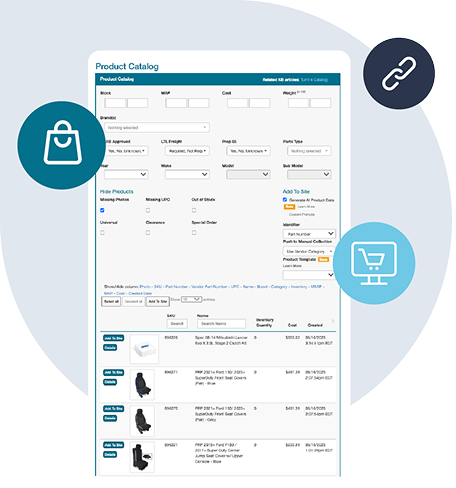
Chattanooga Shooting Product Catalog Automation
The Spark Shipping Chattanooga Shooting integration connects directly to the Chattanooga Shooting API to keep your store updated with accurate product data, pricing, and availability.
You receive automatic updates for:
Product Attributes
- Product descriptions and specs
- UPC, MPN, and identifiers
- Category and brand data
High-Quality Images
- High-resolution images
- Multiple views when available
MAP Pricing and Availability
- MAP-compliant pricing
- Real-time stock levels
- Low stock and out-of-stock updates
Fast Publishing
New Chattanooga Shooting products appear in your dashboard and can be published quickly with complete data.
This gives you a clean, accurate, and always up-to-date Chattanooga Shooting catalog without manual work, supported entirely through the Chattanooga Shooting API.
Want to Find Out More?
Technical Specifications
Synchronize Products
- Create Chattanooga Shooting products in your cart
- Show Chattanooga Shooting products not currently in your cart
- Learn more about Full Product Data Upload
Update Inventory
- Get inventory quantity updates from Chattanooga Shooting
- Update the quantities in your cart
Send Orders
- Get new orders from your cart
- Send order fulfillment requests to Chattanooga Shooting
Update Tracking
- Get tracking updates from Chattanooga Shooting
- Send shipment data to your cart
- Your cart will notify the buyer that their item has shipped
Choose Your Path to Scale
Frequently Asked Questions
Can you give me more information about Chattanooga Shooting?
Chattanooga Shooting Supplies Dealer FAQ
How do I open a Chattanooga Shooting Supplies dealer account?
CSSI sells exclusively to licensed dealers. Apply for a dealer account at chattanoogashooting.com with your FFL—once approved, you get dealer pricing and access to the full 45,000+ SKU catalog, from firearms and ammunition to optics, reloading equipment, and outdoor gear.
Does Chattanooga Shooting Supplies dropship?
Yes—CSSI supports dropshipping for its dealers, with same-day shipping on most in-stock orders. Spark Shipping automates the workflow end to end: your store’s orders route to CSSI automatically, and tracking numbers sync back to your customers without manual entry.
Where do I find the Chattanooga Shooting Supplies catalog for my website?
Your CSSI dealer account provides catalog and inventory data. Spark Shipping consumes those feeds and publishes the products to your Shopify, BigCommerce, WooCommerce, or Magento store—complete with attributes, images, MAP-compliant pricing, and live stock levels, updated automatically.
What do dealers say about Chattanooga Shooting Supplies?
CSSI has a strong reputation among FFL dealers for competitive wholesale pricing, same-day fulfillment, and a knowledgeable sales team with hands-on manufacturer training—one reason it has remained family-owned and dealer-focused since 1977.
Can I sell CSSI products on multiple channels?
Yes. With Spark Shipping, one CSSI integration can feed your website and marketplace channels, with inventory synced everywhere so you never oversell. See our guides to selling on GunBroker and where to sell guns online.
- URL: https://chattanoogashooting.com/
- Category: Firearms
How do I connect Chattanooga Shooting to my ecommerce store?
Connecting Chattanooga Shooting to your ecommerce store requires an approved dealer account and API access from Chattanooga. The connection lets your store receive supplier information and exchange orders and shipment updates with the dealer account.
You can manage listings and supplier orders manually, or ask a developer to build and maintain a connection using Chattanooga's API. Spark Shipping offers a ready-made integration for product information, stock, pricing, orders and tracking, reducing the work of keeping the supplier and store in step.
Connect your store and approved supplier account, then import selected products or match existing listings. Choose stock and pricing rules, and enable automatic ordering once Chattanooga has approved your account for live orders and confirmed the delivery arrangement.
Choose products allowed by your supplier agreement, sales channel and payment provider. A technical connection to a marketplace does not permit its restricted products: eBay, for example, does not allow firearms or firearm ammunition. Chattanooga's developer portal explains access to its API resources.
For platform-specific details, see the Chattanooga Shooting integrations for Shopify, WooCommerce, BigCommerce, Amazon Seller Central, eBay.
What product information can I import from Chattanooga Shooting?
You can import the product information Chattanooga Shooting supplies for your account, with descriptions, images and product codes where available, alongside stock availability and dealer pricing. What you can add to each listing depends on the information supplied and your sales channel's requirements.
You could prepare listings yourself or have a developer build and maintain a catalog connection. Spark Shipping downloads the available supplier information and offers one-click product importing, so you can add selected products to your ecommerce store on supported sales channels without creating each listing manually.
Products you already sell can be matched to the supplier products instead of imported again. This lets you expand the eligible range while keeping existing listings.
How do I sync Chattanooga Shooting inventory with my store and avoid overselling?
Inventory syncing keeps the quantities shown in your ecommerce store aligned with stock available from Chattanooga Shooting. It needs an ongoing connection that receives supplier stock updates and applies them to the matching listings.
You can check stock and edit quantities by hand, or ask a developer to create a stock connection and keep it working. Spark Shipping handles the recurring updates automatically, reducing those repeated checks and edits. Match each listing to the right supplier product, including whether you sell one item or a pack, so stock updates apply correctly.
You can also set a low-stock cutoff, so products show as unavailable when supplier stock falls below your chosen threshold. Stock can change between updates, so syncing reduces overselling risk without eliminating it. See minimum-quantity settings.
How do I automate price updates for Chattanooga Shooting products?
Automating price updates for Chattanooga Shooting requires a connection that receives supplier cost changes before pricing rules can calculate selling prices for your ecommerce store. Choose a markup that allows for your margin, delivery charges and selling fees.
A developer can create the pricing connection and handle its ongoing upkeep. Spark Shipping provides a ready-made integration and, once pricing automation is enabled, applies your rules and updates selling prices as new costs arrive. You avoid repeatedly checking costs and editing each listing yourself.
Where the supplier provides minimum advertised price (MAP) information, use the relevant pricing settings and follow the brand's current policy. See automated price updates.
How do I send orders from my store to Chattanooga Shooting automatically?
To send orders from your ecommerce store to Chattanooga Shooting automatically, connect the store to your approved supplier account for ordering. Match listings to the correct supplier products, including whether you sell single items or packs, and confirm API ordering and your delivery arrangement with Chattanooga.
You can place supplier orders yourself or have a developer build and maintain an ordering connection. With your account ready for live orders and automatic ordering enabled, Spark Shipping sends the assigned order items to Chattanooga, saving you from entering the same order again.
For firearm orders on permitted sales channels, confirm the receiving licensed dealer's delivery details and provide the FFL number and expiration date required by Spark Shipping. See FFL order information.
How do I sync Chattanooga Shooting tracking updates back to my store?
Tracking sync returns shipment details from Chattanooga Shooting to the matching orders in your ecommerce store after the supplier ships and provides tracking.
You can copy those details into the store yourself, or ask a developer to set up and maintain a tracking connection. Spark Shipping collects the available tracking and adds it to the matching orders automatically, saving you from looking up and updating each shipment by hand.
Your sales channel's notification settings determine how customers receive shipping messages. See automated tracking updates.
How do I sell Chattanooga Shooting products alongside other suppliers and stock in my own store or warehouse?
To sell products from Chattanooga Shooting and other suppliers alongside your own stock, connect each source to your ecommerce store and match the same item to one listing. Make sure the product, variant and pack size match across those sources.
You could coordinate fulfillment by hand, or have a developer build and maintain a system that connects your stock sources. Spark Shipping brings them into one setup and routes orders using your chosen rules, reducing the work of dividing and forwarding orders yourself.
Your rules can prioritize stock in your own store or warehouse, or choose between suppliers based on cost or a priority list. Set the stock and backorder preferences to suit how you sell, and use sources approved to fulfill the products and destinations involved. See order-routing options.
Can I connect Chattanooga Shooting to products already listed in my ecommerce store?
Yes. You can connect Chattanooga Shooting to products already listed in your ecommerce store without rebuilding the catalog. Each listing needs to match the corresponding supplier product so stock updates and orders refer to the right item.
Spark Shipping supports matching even when your store uses different product codes from Chattanooga. Match the exact product, variant and pack size rather than similar names. Once the connection is set up, Spark Shipping can update stock, apply enabled pricing rules and send assigned orders while preserving your listings.
Where do I get Chattanooga Shooting API access to connect my ecommerce store?
Start with your Chattanooga Shooting dealer account and the supplier's developer portal. The portal provides documentation and manages access to an API for product information, order placement and order status. You need to log in to view those resources.
Ask Chattanooga to confirm the API access authorized for your account and the details to use with Spark Shipping. Confirm permission to place live orders and the delivery arrangement as well as access to product information.
Your developer could use the authorized API to build a connection, with ongoing maintenance handled by your team. Spark Shipping provides the ready-made integration, so you can connect your ecommerce store to the approved account and automate supported product, stock, pricing, order and tracking exchanges without maintaining your own connector.