
Need to integrate Tedd Cycle with WooCommerce?
- Are you struggling to integrate WooCommerce with your e-commerce store?
- Are you spending hours keeping product listings updated?
- Is order tracking for your customers difficult?
WooCommerce Integration Details
- Integration Method: API
- Setup Fee: Free
- Categories:
.png)

Trusted Automation for Fast-Growing eCommerce Brands





Product Data
- Load complete product listings with rich attributes.
Inventory and Pricing:
- Sync stock and pricing automatically.
- Maintain MAP compliance.
- Prevent overselling.
Orders and Tracking:
- Route orders directly to WooCommerce.
- Receive tracking updates back to your shopping cart automatically.
How to Connect WooCommerce to Your Shopping Cart
- Log in to your vendor’s dealer portal and look for a section labeled API, Integrations, or Data Feeds. If unavailable, contact your vendor representative to request their API keys or FTP credentials.
- In your Spark Shipping dashboard, go to Vendors.
- Click Add Vendor, then select WooCommerce from the list of integrations.
- Enter the credentials you retrieved in Step 1 (such as API Keys, FTP details, or Client IDs) into the corresponding fields.
- Click the Test Connection button to confirm that Spark Shipping can communicate with WooCommerce’s system.
- Once validated, the connection is live. Spark Shipping will begin downloading the product catalog (the initial sync time varies by vendor).
- You can now configure your automation rules to automatically sync inventory, pricing, and route orders.

-1.webp)


-1.webp)








%20(1)-1-1.webp?width=200&name=weapon-depot-logo%20(1)%20(1)-1-1.webp)
Case Study
-

"Choosing Spark Shipping was a game-changer for us at Juiced Accessories. Their ability to swiftly implement solutions made a significant impact."
-
"Since using Spark Shipping we have seen growth in sales and a reduction in time spent processing orders. Spark Shipping's inventory and ordering save us a lot of time and have brought us extra business opportunities with the inventory data."


Choose Your Path to Scale
WooCommerce Integration Benefits

List WooCommerce Products Fast
- Automatically update your site with available stock
- List thousands of products in seconds
- Update the latest prices
- Stay in MAP compliance
- Upload images and descriptions
- Include products from multiple suppliers
- Send orders directly to your distributor

Improve User Experience and Grow WooCommerce Sales
- Connect your product catalog with customer-facing apps
- Maximize product choice for customers
- Allow users to search large product databases with ease
- Build trust with customers & elevate your brand

Automate WooCommerce Tracking
- Automatically provide your distributors tracking updates to customers
- Save time dealing with customer tracking requests
- Improve customer experience
WooCommerce Product Catalog Automation
The Spark Shipping WooCommerce integration connects directly to the WooCommerce API to keep your store updated with accurate product data, pricing, and availability.
You receive automatic updates for:
Fitment and Product Attributes
- Year, Make, Model compatibility
- Product descriptions and specs
- UPC, MPN, and identifiers
- Category and brand data
High-Quality Images
- High-resolution images
- Multiple views when available
MAP Pricing and Availability
- MAP-compliant pricing
- Real-time stock levels
- Low stock and out-of-stock updates
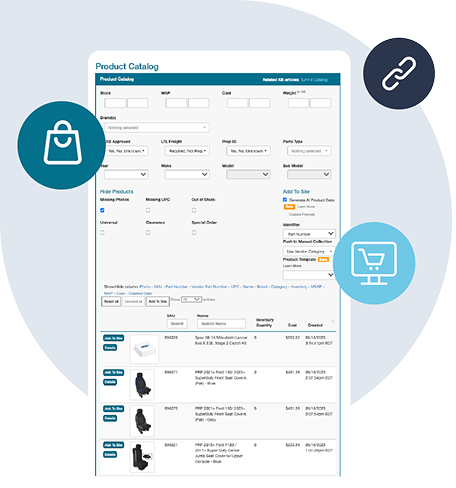
Fast Publishing
New WooCommerce products appear in your dashboard and can be published quickly with complete data.
This gives you a clean, accurate, and always up-to-date WooCommerce catalog without manual work, supported entirely through the WooCommerce API.
Want to Find Out More?
Technical Specifications
Synchronize Products
- Create WooCommerce products in your cart
- Show WooCommerce products not currently in your cart
- Learn more about Full Product Data Upload
Update Inventory
- Get inventory quantity updates from WooCommerce
- Update the quantities in your cart
Send Orders
- Get new orders from your cart
- Send order fulfillment requests to WooCommerce
Update Tracking
- Get tracking updates from WooCommerce
- Send shipment data to your cart
- Your cart will notify the buyer that their item has shipped
Choose Your Path to Scale
Frequently Asked Questions
What is the WooCommerce API and how does it work?
The WooCommerce API allows ecommerce platforms and automation tools to connect directly to WooCommerce systems. Through the API, your store can access live product data, inventory levels, pricing, fitment information, and order status updates. This enables fully automated workflows, including product publishing, inventory synchronization, real-time availability checks, and automated order routing.
How does WooCommerce automation help ecommerce stores?
WooCommerce automation eliminates manual data entry and reduces errors by keeping your store updated automatically. With a proper integration, your ecommerce store can sync products, pricing, inventory, and tracking directly from WooCommerce. This improves accuracy, prevents overselling, increases fulfillment speed, and reduces the operational workload for WooCommerce retailers and resellers.
Which ecommerce platforms support WooCommerce integration?
WooCommerce integrations are supported across major ecommerce platforms through tools such as Spark Shipping. Supported platforms include Shopify, BigCommerce, Magento, WooCommerce, Amazon, eBay, Walmart Marketplace, and others. A platform that integrates through the WooCommerce API can automatically handle product creation, stock updates, order routing, and tracking updates without manual work.
What types of products are included in the WooCommerce catalog?
WooCommerce integrations are supported across major ecommerce platforms through tools such as Spark Shipping. Supported platforms include Shopify, BigCommerce, Magento, WooCommerce, Amazon, eBay, Walmart Marketplace, and others. A platform that integrates through the WooCommerce API can automatically handle product creation, stock updates, order routing, and tracking updates without manual work.