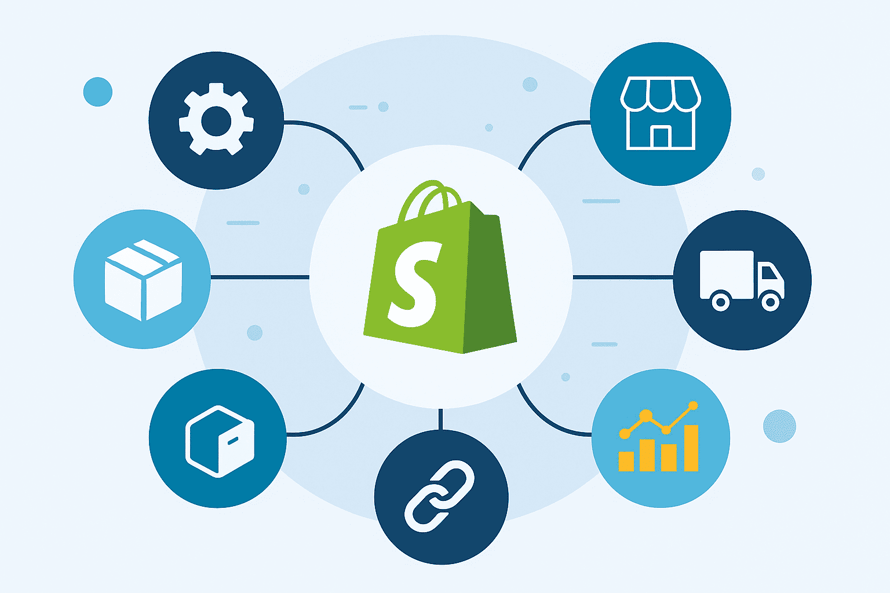
Running a Shopify store in 2025 means managing far more than a website and checkout.
You’re operating in a global ecommerce market projected to reach more than $6 trillion in sales, with over 28 million online stores competing for attention.
In this large, fast-moving industry, manual processes can’t deliver the profits and customer satisfaction businesses aim for.
That’s where Shopify integration comes in.
At its core, “Shopify integration” means connecting your store to the tools, vendors, marketplaces, and systems that run your business automatically.
It covers all aspects of the Shopify ecommerce process, from syncing supplier inventory and fulfillment data to linking your enterprise resource planning (ERP) or customer relationship management (CRM) tools to automating email flows and reporting.
Today, nearly 80% of marketers automate large parts of their customer journey. Merchants who rely on disconnected systems are likely to fall behind.
This guide covers the full spectrum of Shopify integration, including:
- Vendor integrations for product data, pricing, accurate inventory management, and fulfillment.
- Apps for marketing, analytics, customer service.
- Marketplaces like Amazon and eBay.
- Back-office systems such as ERPs, WMS platforms, and PIMs.
By the end, you’ll have a complete understanding of how to build a fully automated Shopify ecosystem that scales, reduces overhead, and seamlessly supports multi-vendor operations.
The Business Value of Shopify Integration
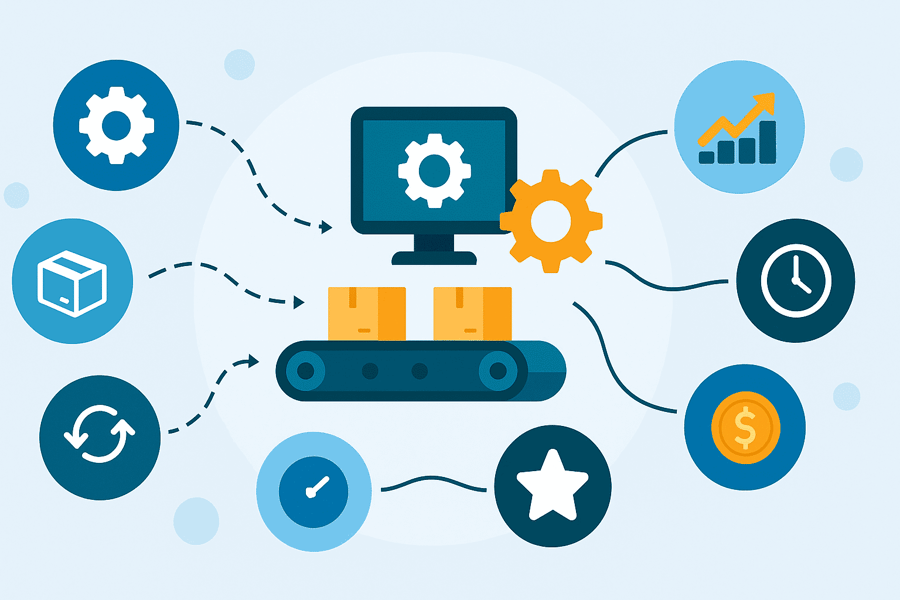
Integrations directly impact profitability, operational efficiency, and the customer experience.
Here are some of the ways they impact businesses using Shopify:
Reduced manual work
Without connected systems, your team may spend hours on routine tasks, like:
- Copying product and order data.
- Reconciling inventory.
- Checking vendor availability.
- Routing fulfillment.
Integration automates these steps, freeing your team to focus on higher-value tasks.
Real-time inventory + fewer oversells
Stock accuracy is one of the biggest challenges for Shopify sellers, especially those working with multiple vendors or dropship suppliers.
Studies show that merchants who rely on manual updates face oversell rates of around 10%, while those that use automated synchronization reduce this to under 1%. Real-time inventory syncing protects your brand and reduces costly cancellations.
Faster fulfillment
Shipping happens sooner when orders flow automatically to vendors, third-party logistics companies (3PLs), or fulfillment partners. Customer satisfaction also improves as a result.
Automation eliminates delays caused by batching orders, sending PDF purchase orders, or manually checking stock levels.
Consistency across channels
Like most modern merchants, you probably sell on a number of platforms, including Amazon, Walmart, and other marketplaces. A reliable Shopify Amazon integration helps ensure that every Amazon sale updates your Shopify inventory immediately, so your store always reflects what’s actually in stock.
Integrated systems ensure each channel operates from the same source of truth, preventing errors and customer complaints.
Ability to scale SKUs, vendors, and sales channels
Ecommerce is growing rapidly, with global automation tools projected to exceed $8 billion in market value this year.
Businesses with strong integrations can add new products, suppliers, or sales channels without creating excessive manual work.
Improved customer experience
Accurate stock levels, reliable delivery, and clear fulfillment status all contribute to trust, repeat business, and positive reviews. Customers expect seamless experiences across channels; integrations help deliver that consistently.
Types of Shopify Integrations
Shopify integrations typically fall into six major categories. Understanding these pillars makes it easier to plan a scalable tech stack and identify where gaps exist.
This section looks at each in detail.
1) Vendor integrations
These connect Shopify to your suppliers, dropship vendors, or distributors.
They automate:
- Inventory updates
- Product data imports
- Pricing changes
- Order routing
- Shipping and order ID tracking updates
Vendor integrations dramatically reduce oversells and enable scalable, multi-vendor operations.
2) Fulfillment and logistics integrations
These connect Shopify to 3PLs, warehouses, and shipping platforms. They improve delivery speed, ensure consistent tracking, and eliminate delays caused by manual fulfillment workflows.
With automation and data-driven logistics now dominating ecommerce operations, these integrations are becoming foundational.
3) Marketplace integrations
These sync listings, orders, tracking, and inventory between Shopify and major marketplaces.They prevent overselling across channels and standardize fulfillment, especially when orders from multiple marketplaces flow through a single network of vendors or fulfillment partners.
4) Back-office integrations
As stores grow, they typically adopt systems for accounting, procurement, warehouse operations, product data management, or master stock control.
Integrating these with Shopify ensures:
- Unified product data.
- Accurate financial records.
- Better stock planning.
- Consistent catalogue updates.
These are essential for merchants scaling beyond the small to medium business stage.
5) Marketing and customer data integrations
These integrations feed Shopify orders and customer data into your marketing tools, enabling business owners to segment audiences, generate personalized messaging, and inform automated processes.
Given that many businesses report difficulty in synchronizing cross-channel data, marketing integrations play a big role in operational efficiency.
Examples of these tools include:
- SMS marketing automation platforms like Klaviyo.
- CRMs like HubSpot or Salesforce.
- Analytics platforms like GA4 and business intelligence tools like Looker Studio.
6) Custom/API integrations
For workflows that apps don’t cover, Shopify’s Admin API, GraphQL API, and webhooks allow merchants to build custom logic, connect proprietary systems, or automate complex processes unique to their business.
Vendor Integrations: The Most Important Integration for Shopify
Most Shopify integration guides focus on apps, marketing tools, or marketplaces. But the most important integration for many ecommerce businesses is the connection between Shopify and your vendors. This is especially true for dropshipping and multi-vendor stores.
Vendor integrations are what keep your store accurate, automated, and scalable. They ensure that the product data shoppers see matches what your suppliers can actually fulfill.
What vendor integrations are
A vendor integration connects Shopify directly to your suppliers, distributors, or dropship partners. This sends the data that matters most into your store automatically, including:
- Inventory levels.
- Product data (SKUs, descriptions, pricing, variants).
- Order details.
- Tracking numbers.
Unlike traditional Shopify apps, which add features to your storefront, vendor integrations support the operational backbone of your business.
They make sure you only sell what your suppliers can fulfill and that your customers always receive accurate information.
This is also different from working with a single fulfillment provider. A vendor integration lets you manage multiple suppliers, each with its own data formats, stock rules, and shipping processes.
Why vendor integrations matter for Shopify
Vendor integrations are especially valuable because so many merchants now use multi-vendor or dropshipping models.
Around 33% of ecommerce businesses prefer dropshipping instead of managing in-house inventory.
Without automation, these businesses would spend hours managing supplier spreadsheets, stock updates, and manual orders.
Here’s why vendor integrations matter:
- Multi-vendor dropshipping: You can list products from multiple suppliers without managing stock yourself.
- Avoiding oversells and cancellations: Real-time inventory syncing prevents selling out-of-stock items. This is one of the biggest operational issues for dropship and marketplace sellers.
- Automated order routing: Orders automatically go to the correct vendor based on SKU or rules you create.
- Accurate pricing and MAP updates: If your vendor updates costs or MAP pricing, those changes sync into Shopify automatically.
- Customer-facing accuracy: When your product data comes directly from the vendor, customers see accurate details, availability, and delivery expectations.
How vendor integrations work in practice
Every vendor works differently, but integrations typically follow the same pattern:
- Vendors send product data and inventory through CSV, XML, API, FTP, or EDI.
- Your integration maps vendor SKUs to your Shopify SKUs.
- Shopify updates inventory, pricing, and product data.
- When a customer places an order, the integration automatically sends it to the correct vendor.
- Vendors fulfill the order and send back tracking numbers, which appear in Shopify.
- Customers receive automatic email or SMS updates.
This workflow reduces human error, eliminates manual copy-and-paste, and ensures each step occurs in real time.
A good example of a vendor integration is Spark Shipping. The platform links your Shopify store to your suppliers and dropship partners.
It automates inventory updates, product data, order routing, and tracking, even when vendors use different file formats or systems.
Spark Shipping specializes in vendor automation. The platform connects Shopify to vendors using almost any feed format. This is critical because suppliers rarely follow a consistent standard.
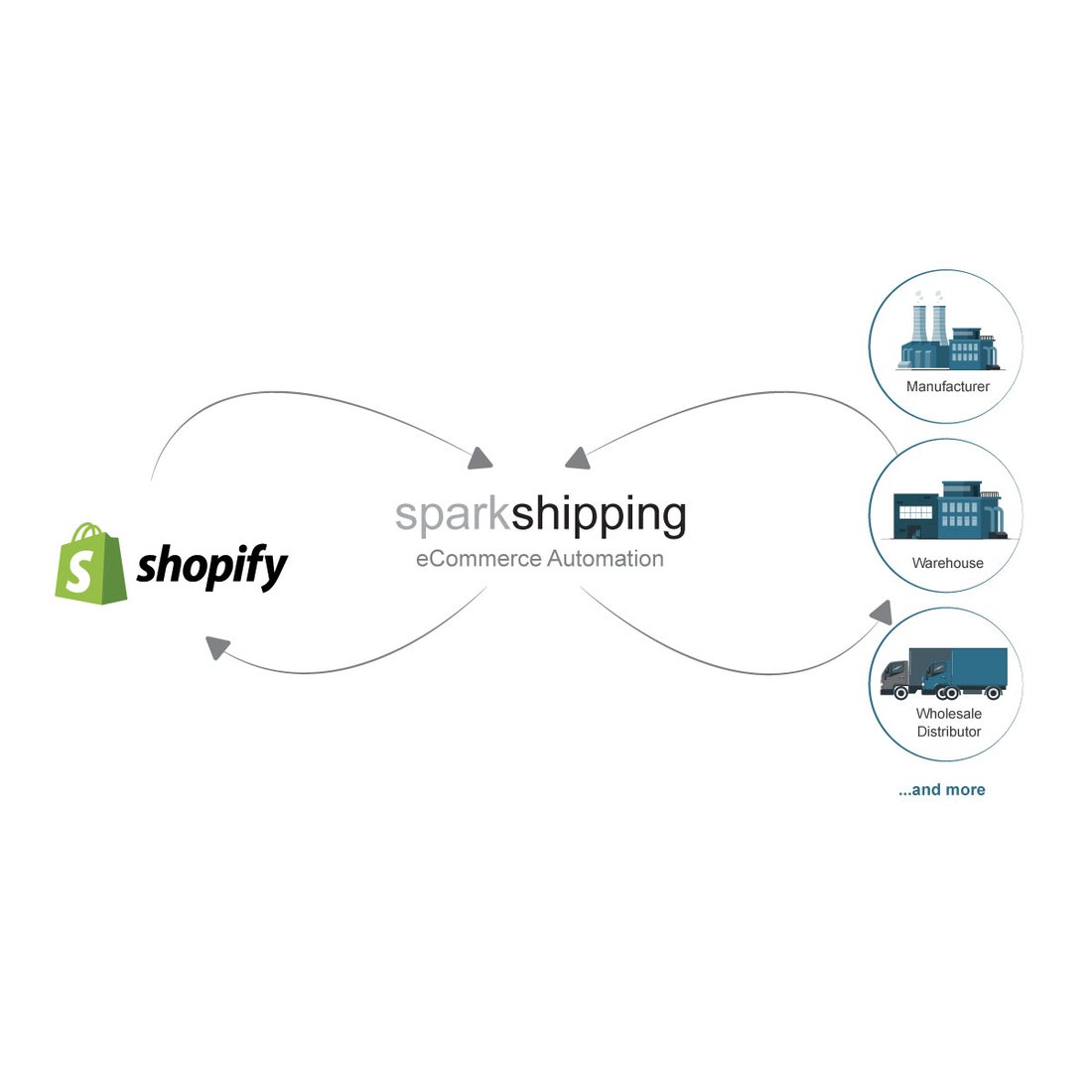
With Spark Shipping, you can:
- Add vendors using API, FTP, EDI, XML, CSV, or hosted files.
- Map vendor SKUs to Shopify SKUs.
- Sync inventory and product data automatically.
- Automate order routing to the correct vendor.
- Send vendor tracking numbers back to Shopify.
- Handle exceptions, delays, and return updates.
- Manage all vendors and channels from a single dashboard.
This creates a unified fulfillment workflow that keeps Shopify, your vendors, and your customers in sync.
Step-by-Step: How to Integrate Vendors with Shopify Using Spark Shipping
This section explains the vendor integration process, from preparation to launch.
Before connecting anything to Shopify, make sure you have:
- A clean SKU system
- Vendor credentials or access details
- Feed formats (API, FTP, XML, CSV, EDI)
- Shipping and fulfillment rules
- A test environment or test SKUs
Vendor integrations work best when they follow a clear, structured setup. Below is a full walkthrough of how to connect Shopify to your vendors using Spark Shipping, from preparation to launch.
Step 1: Connect your Shopify store
The first step is linking Shopify to Spark Shipping so the two systems can share data. You do this by creating Shopify API credentials inside your store’s admin.
Once generated, you assign the correct permissions so Spark Shipping can perform actions like reading inventory, updating products, and creating fulfillments.
After you enter these API credentials into Spark Shipping, the platform runs a connection test.
This confirms that Spark Shipping can read your catalog, check stock levels, and update orders.
If anything is wrong, such as missing permissions, you’ll see an error that tells you what to fix before moving on.
Step 2: Add your vendors
Next, you add each vendor you work with. Every supplier sends data differently, so Spark Shipping lets you choose from multiple integration types, including:
- API.
- FTP/FTPS.
- EDI.
- XML.
- CSV.
- A hosted file.
When you choose a vendor type, you upload the feed or enter the vendor’s connection details (such as an API key or FTP login). Spark Shipping then pulls in a sample of the vendor’s data so you can review it.
This step ensures the feed is formatted correctly and that the vendor is sending everything you need, including SKUs, pricing, stock counts, and product attributes.
If the sample data looks right, you save the vendor integration and move on to mapping.
Step 3: Map products and SKUs
Mapping connects your Shopify products to the products your vendor supplies. Because vendors often use different SKUs than those in your store, this step ensures inventory and orders match correctly.
In Spark Shipping, you review the vendor’s SKUs and link them to the corresponding Shopify SKUs. You can also apply pricing rules, such as markup percentages, or choose whether vendor pricing should override your existing prices.
If your vendor supplies variants, such as size or color, you map them as well so Shopify receives accurate variant-level inventory.
Once mapping is complete, Spark Shipping knows exactly which vendor products match which Shopify listings.
Step 4: Configure order routing
Order routing tells Spark Shipping which vendor should fulfill each order. If you work with only one supplier, routing is simple. If you use several vendors, this step becomes essential.
You can assign routing rules based on product, SKU, collection, or vendor priority. For example, Product A may always ship from Vendor 1, while Product B ships from Vendor 2.
Spark Shipping also lets you set back-order logic. If a vendor is out of stock, you can route the order to a backup supplier, hold the order, or cancel it automatically.
For orders that include products from multiple vendors, you can enable split fulfillment. Each vendor receives only the order lines they are responsible for, and Shopify creates separate shipments so the customer can track each one individually.
Step 5: Sync inventory and price feeds
Once your mapping and routing rules are in place, you turn on inventory and pricing sync. Spark Shipping reads the vendor’s feed at a frequency you define, every few minutes, hourly, or on a custom schedule, and pushes updates into Shopify.
Real-time syncing prevents overselling and ensures that customers only see accurate stock information.
During setup, you can also choose how Spark Shipping should handle exceptions, such as missing SKUs, discontinued products, negative inventory, or formatting issues in the vendor’s file.
If the vendor sends pricing updates, Spark Shipping can push those into Shopify automatically or apply your pricing rules first.
Step 6: Automate tracking and fulfillment updates
When a customer places an order, Spark Shipping sends it to the vendor instantly using the integration method you configured.
As soon as the vendor ships the order and submits tracking, Spark Shipping receives that tracking number and updates the order in Shopify.
Shopify then notifies the customer through email or SMS, depending on your settings. This creates a smooth, automated fulfillment experience where the customer always knows when their order has shipped.
Step 7: QA and launch
Before going live, it’s essential to test your setup. Place several test orders covering different products, vendors, and routing rules, and watch how they move through the system.
Check that:
- Orders are routed to the correct vendor.
- Inventory updates flow into Shopify correctly.
- Tracking numbers appear in Shopify on time.
- Pricing and variants display as expected.
Once everything works consistently, you can push your integration into full production. From this point on, Spark Shipping handles vendor syncing, routing, and tracking automatically, without the daily manual effort that usually comes with managing suppliers.
Marketplace Integrations: Amazon, eBay, Walmart
Marketplace integrations let you sync listings, inventory, orders, and tracking between Shopify and major sales channels like Amazon, eBay, and Walmart.
Many Shopify sellers expand to marketplaces to reach new customers. However, sales made on Amazon or eBay must update Shopify inventory immediately. If they don’t, you risk overselling and disappointing customers.
Here’s a quick look at how marketplace orders sync:
- A customer places an order on Amazon, eBay, or Walmart.
- The integration imports the order into Shopify or your central system.
- Shopify stock adjusts automatically.
- Fulfillment details and tracking flow back to the marketplace.
Here are a few things to consider when using marketplace integrations:
- Ensure SKU consistency: Your SKUs must match across platforms so that inventory updates are applied correctly to each channel. Marketplace mismatches often lead to overselling and fulfillment delays.
- Connect vendor integrations: Vendor integrations can automatically route marketplace orders to your vendors. This gives you a single fulfillment workflow across all channels.
- Returns rules: Each marketplace has its own return rules. Integrations need to keep these aligned with your Shopify workflow to keep your reporting accurate.
Back-Office Shopify Integrations (ERP, PIM, IMS, WMS, OMS)
Back-office integrations connect Shopify to the systems that run your operations behind the scenes. These systems manage a range of critical functions, including:
- Accounting.
- Inventory.
- Purchasing.
- Product data.
- Warehouse activity.
As a business grows, it becomes harder to manage these manually.
Research on supply chain analytics shows that modern ecommerce depends on connecting vendor and supplier data across the entire tech stack so stock and orders stay accurate.
Back-office integrations make this possible by linking Shopify to the following operational tools:
- Enterprise resource planning (ERP): Manages accounting, purchasing, vendor data, and core operations.
- Product information management (PIM): Stores detailed product data, attributes, categories, and rich content.
- Inventory or warehouse management systems (IMS/WMS): Handle stock levels, warehouses, picking, packing, and shipping.
- Order management system (OMS): Decides how and where orders are fulfilled, especially across multiple warehouses or vendors.
Integrating these systems with Shopify helps ensure that every department works off the same accurate data.
How data flows between systems
When back-office systems are connected, Shopify always displays accurate product information, inventory levels, and financial records without anyone re-entering data by hand.
Here’s how that data typically flows:
Product and catalog data: from PIM/ERP to Shopify
Your PIM or ERP holds your master product information. When those systems send updated titles, descriptions, attributes, or categories to Shopify, your storefront stays accurate without manual edits.
Orders: from Shopify to your OMS or ERP
When a customer places an order in Shopify, the order is pushed to your OMS or ERP. Those systems decide where the order should ship from and update financial records like revenue, tax, discounts, and costs.
Inventory updates: from WMS/IMS to Shopify
Your warehouse system always has the most accurate stock counts. By sending those numbers back to Shopify, your storefront shows actual availability rather than estimates, preventing overselling.
Financial data: from Shopify to your accounting system
Shopify sends order totals, taxes, refunds, and payouts to your accounting platform. This keeps your books up to date and removes the need for manual data entry.
All of these connections exist to eliminate double-entry, reduce errors, and ensure that every system uses the same source of truth.
Which merchants need this level of integration
Back-office integrations become essential once a business grows beyond simple operations.
Most merchants earning around $3–5M+ in annual revenue rely on ERP, PIM, IMS, or WMS tools to manage their catalog, inventory, and fulfillment workflows.
At this scale, manual updates create errors, slow teams down, and limit growth. Integrations allow these businesses to scale product lines, warehouses, and vendor networks without adding more admin work.
Tool example: NetSuite
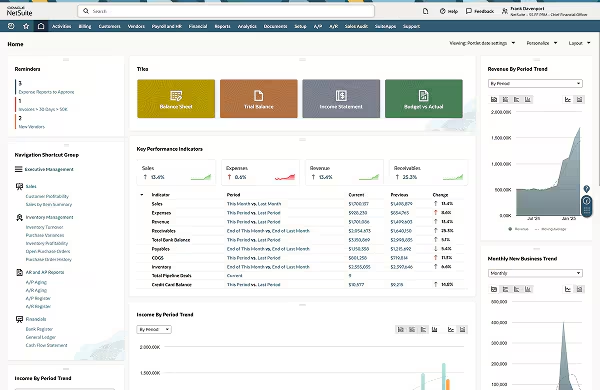
NetSuite is a cloud-based ERP system used by growing ecommerce brands to manage finance, purchasing, inventory, and operations from a single platform.
Shopify NetSuite ERP integration enables merchants to centralize accounting, automate purchase orders, and maintain consistent inventory across warehouses and sales channels.
For businesses managing large catalogs or multiple fulfillment locations, NetSuite provides a unified source of truth for product data, stock levels, and financial reporting, which reduces manual work and helps maintain accuracy as the business scales.
Marketing and Customer Data Integrations
Marketing tools rely on accurate Shopify data to personalize messages, automate communication, and understand how customers interact with your store.
These integrations turn everyday events, such as orders, browsing behavior, and product views into targeted marketing actions.
Email and SMS automation
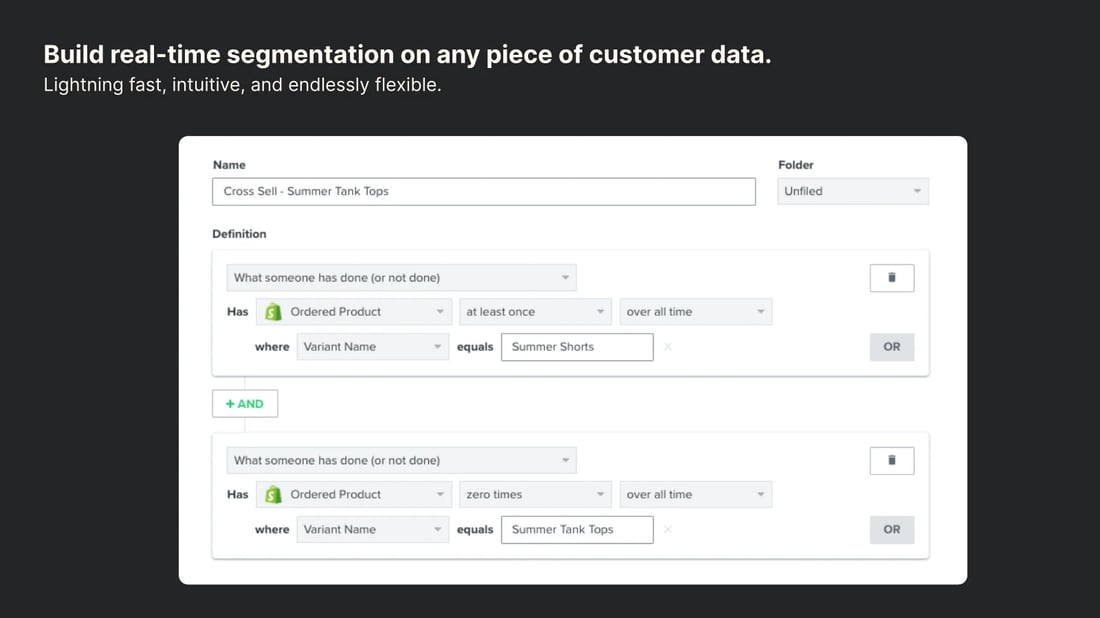
Klaviyo connects directly to Shopify and uses real-time store data to trigger automated flows. It can send abandoned cart reminders, post-purchase follow-ups, review requests, back-in-stock alerts, and more.
Every message is tailored to each customer's behavior in your store, making communication more relevant and timely.
CRM integrations
CRMs use Shopify orders and customer data to build complete customer profiles. When Shopify is integrated with a CRM, every purchase, email interaction, or support message becomes part of a structured online sales pipeline.
Examples of popular CRM platforms include:
However, one of the most popular platforms is HubSpot. This CRM helps Shopify merchants track customer relationships, marketing activity, and sales conversations in one place.
When connected to Shopify, HubSpot automatically pulls in customer profiles, order history, and browsing behavior. This gives teams a complete view of each shopper, from the first visit to repeat purchase.
Merchants use HubSpot to manage email campaigns, segment customers, track engagement, and coordinate support or sales outreach.
For stores that want clearer customer insight or more advanced lifecycle marketing, HubSpot provides an organized, data-driven foundation.
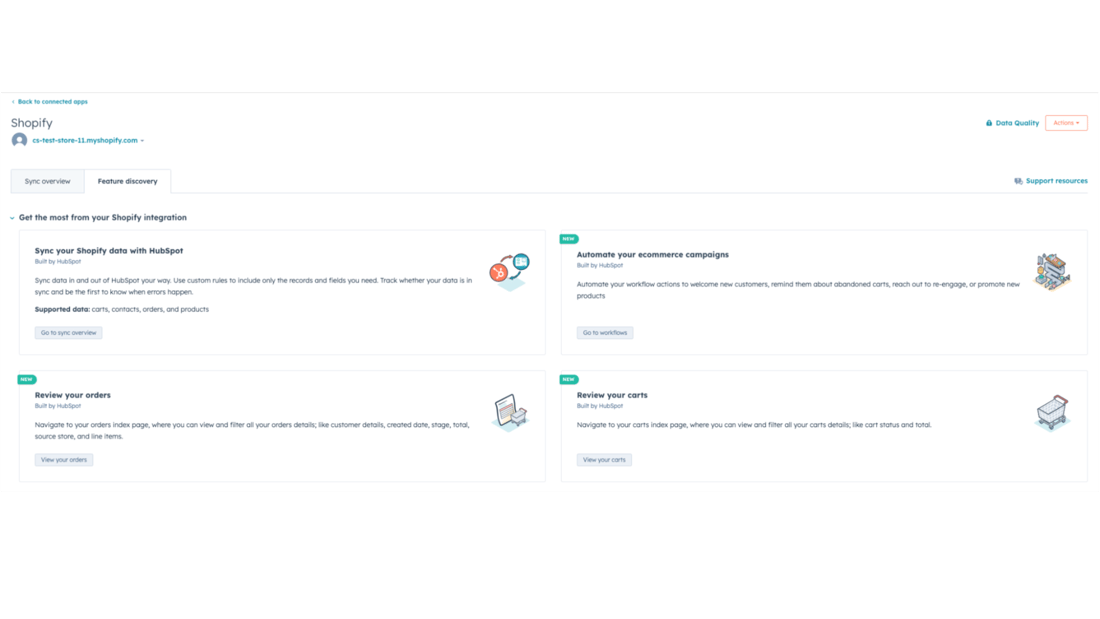
This helps support and sales teams track engagement, manage conversations, and understand each customer’s history.
Analytics and BI tools
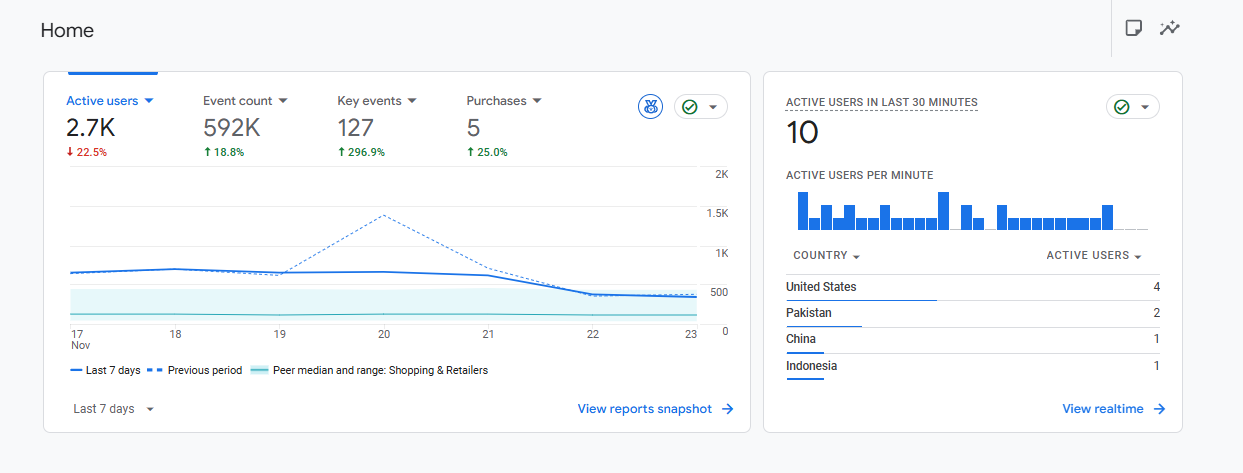
Analytics platforms, such as GA4, Looker Studio, or dedicated ecommerce BI tools, rely on Shopify integrations to pull in sales, product performance, traffic, and customer behavior data.
These tools turn raw Shopify data into dashboards and reports that help merchants measure growth and spot trends.
SMS platforms
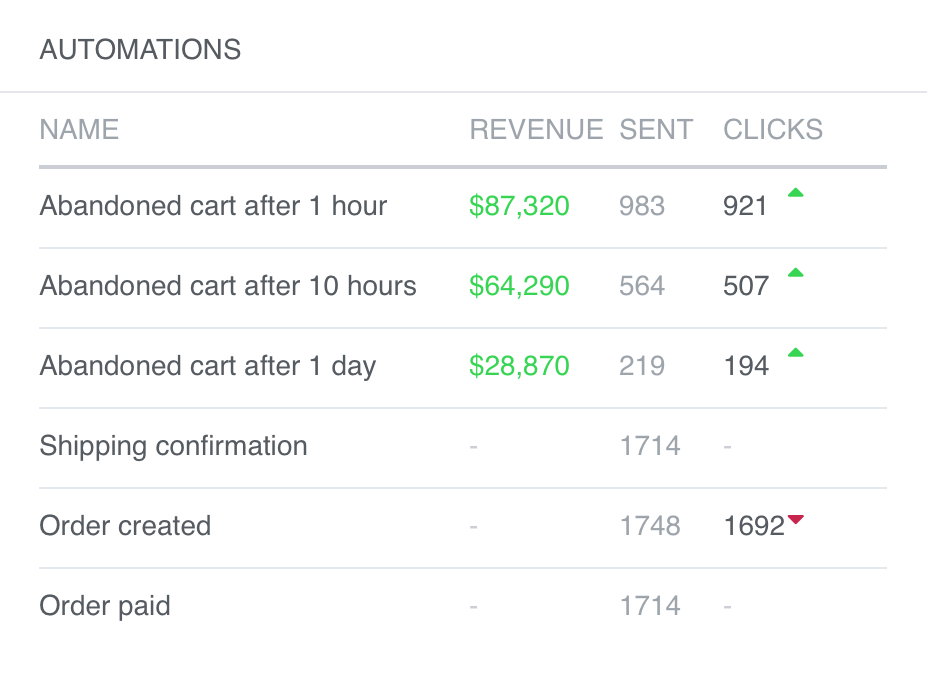
SMS tools like Attentive, Postscript, and SMSBump use Shopify triggers to send targeted text messages. When an order is placed, fulfilled, or refunded, these tools can send instant updates to customers.
They also use browsing and cart behaviors to send personalized messages that drive conversions.
Workflow automation
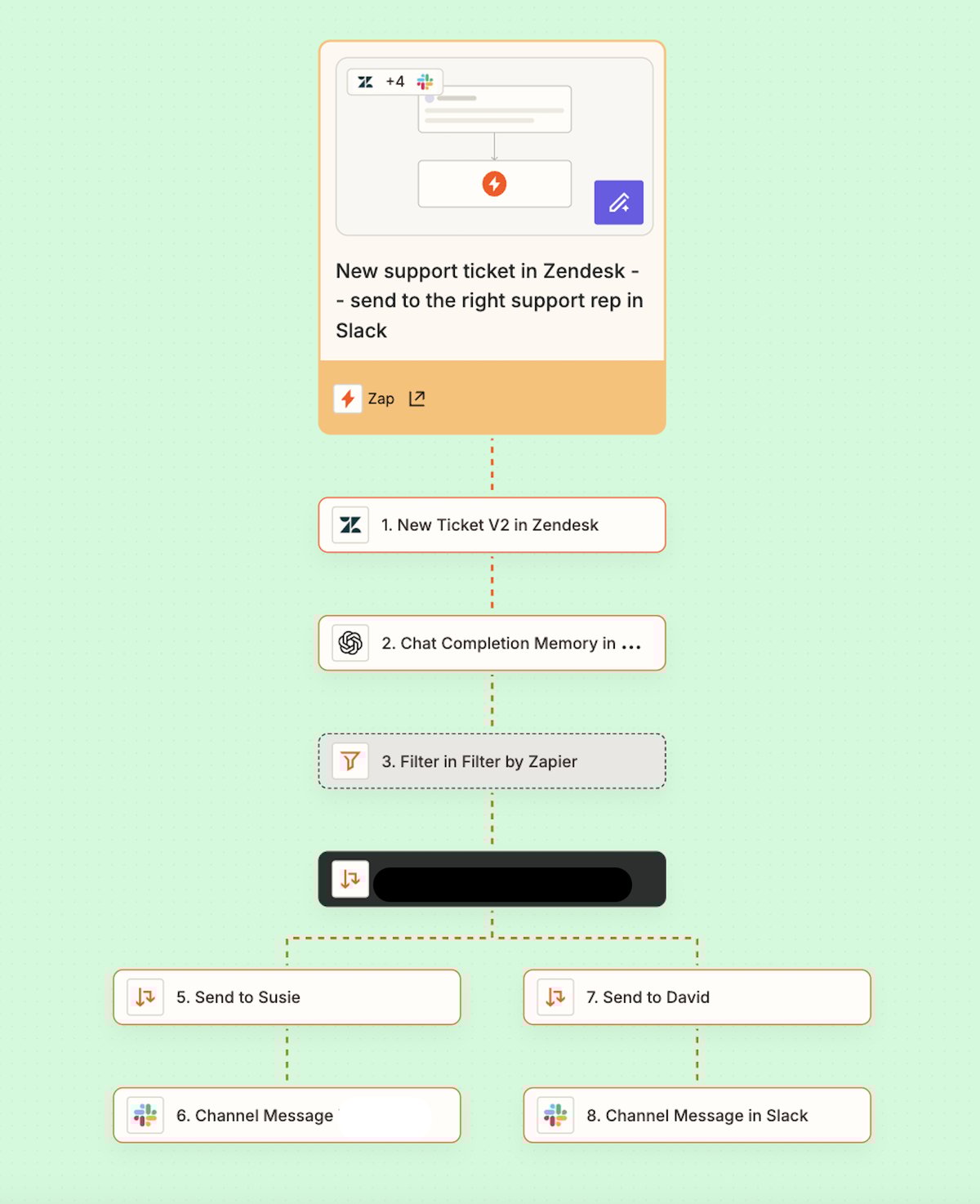
Zapier enables merchants to automate tasks without writing code. By connecting Shopify to more than 2,000 apps, Zapier can do things like:
- Send order details to spreadsheets.
- Send notifications to internal teams.
- Update third-party apps.
- Trigger workflows in tools.
These automated, multi-app workflows are known as “Zaps”. Below is an example of a Zap that automates support requests:
Custom and API Integrations for Shopify
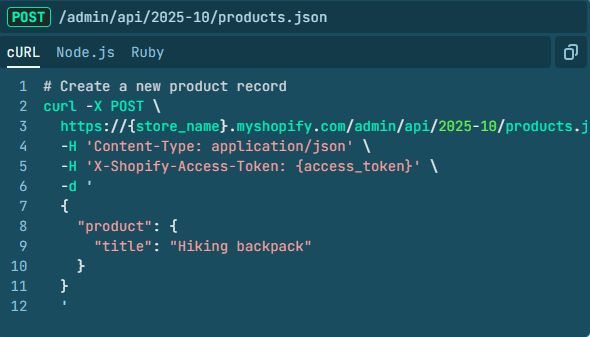
As businesses grow and their operations become more complex, they often need custom solutions that connect Shopify to systems, vendors, or workflows that don’t have ready-made integrations. Shopify’s APIs and webhooks enable developers to connect these solutions to the platform.
Admin API
The Shopify Admin API gives developers direct access to the core parts of a store: products, orders, customers, inventory, and fulfillment details.
With this API, you can build integrations that automatically create or update products, push new orders into external systems, adjust stock levels, or generate fulfillments. It’s the foundation for any deep, custom connection to Shopify.
GraphQL API
Shopify also offers a GraphQL API that delivers only the specific data an integration requests. Instead of returning a large block of information and forcing your system to sort through fields you don’t need, GraphQL lets you request only the exact pieces of data required. That makes each request smaller, faster, and more efficient.
This is especially helpful for stores with large product catalogs or high order volume, where pulling unnecessary data can slow down other systems or increase API load.
Webhooks
Webhooks allow Shopify to notify external systems the moment something happens in the store. When an order is created, fulfilled, canceled, or refunded, Shopify can send a real-time update to another platform.
The same applies to product changes, customer updates, and inventory adjustments. These webhooks act as triggers for custom workflows, ensuring other systems stay in sync without delays or manual input.
When custom builds make more sense than apps
While apps are ideal for common use cases, some businesses require logic that off-the-shelf tools can’t handle. Custom integrations are often the better choice when:
- The workflow is highly specific or unique to your business.
- You need to connect to a proprietary system that doesn’t have a public app.
- Your vendor or supplier sends data in unusual formats or with custom rules.
- Your operation requires deeper control over how data is processed or synced.
In these situations, custom development offers greater flexibility and long-term reliability than forcing an app to fit a complex workflow.
Common Shopify Integration Challenges

Even with strong workflows, Shopify integrations can run into issues if data or setup details aren’t handled correctly. Below we’ve listed typical integration challenges so you can take steps to avoid them.
Data mismatches
If vendor SKUs don’t match the SKUs in Shopify, or if product variants are missing or formatted differently, inventory and product updates won’t sync properly. These mismatches often lead to missing items, incorrect stock counts, or failed updates.
Vendor delays
Some suppliers upload inventory files once per day or return tracking information slowly. When vendors don’t send updates on time, orders may appear “in progress” longer than expected, and customers may not receive tracking information promptly.
Marketplace sync issues
Selling on Shopify and marketplaces like Amazon or Walmart requires consistent SKU mapping. If products aren’t mapped correctly, marketplace orders won’t deduct stock from Shopify. This is one of the most common causes of overselling.
API throttling
Shopify limits the number of API requests a store can make in a short period. Stores with extensive catalogs or frequent updates may hit those limits, causing slow updates or delayed syncs. Efficient syncing and batching help avoid this.
Multi-vendor routing problems
If routing rules are set incorrectly, orders may be sent to the wrong vendor or split when they shouldn’t be. These errors slow down fulfillment and increase the chances of cancellations.
Bad SKU architecture
Inconsistent SKU naming makes it difficult to sync data across systems. If two vendors use different formats or a store uses multiple naming styles, integrations may struggle to match products correctly.
Fixes and best practices
Most challenges can be avoided with a few consistent practices:
- Use a standardized SKU format across all vendors and internal systems.
- Test vendor feeds regularly to catch errors early.
- Use a central integration platform to coordinate updates.
- Monitor logs and alerts to identify issues quickly.
- Keep documentation up to date so new products and vendors follow the same rules.
These steps reduce the risk of failed syncs and make troubleshooting faster when issues appear.
Measuring Integration Success: KPIs to Track
Good integrations should save time, reduce errors, and improve reliability. Key performance indicators (KPIs) help you measure whether your integrations are delivering the results you expect.
Here are some you can monitor:
- Fulfillment speed: Track how quickly orders move from “placed” to “shipped.” Faster fulfillment often indicates clean vendor connections and reliable data flows.
- On-time tracking updates: Vendors should promptly return tracking numbers. Delays may signal sync issues or slow vendor processes.
- Inventory accuracy: Your inventory counts in Shopify should consistently match your vendors’ real stock levels. Large gaps indicate a sync problem.
- Oversell rate: Oversells should be rare. A rising oversell rate often means that inventory updates aren’t happening quickly enough or SKU mappings are incorrect.
- Manual tasks reduced: A successful integration should replace manual work. Track how many tasks, such as sending purchase orders or updating stock, no longer require human input.
- Vendor performance: Measure each vendor’s reliability by tracking fulfillment time, error rates, and how often they send late updates.
- Marketplace order sync health: Monitor how consistently marketplace sales update Shopify.
Errors here usually appear as oversells, mismatched stock, or missing orders.
These KPIs show how well your integrations are working and where improvements are needed.
Start Automating Your Shopify Operations
Integrating Shopify with your vendors, marketplaces, marketing tools, and back-office systems transforms your store into a connected, automated operation.
Vendor integrations form the foundation of this workflow by keeping inventory accurate, routing orders correctly, and ensuring customers receive timely updates.
Spark Shipping enables these integrations by automating every step of the vendor workflow, from inventory and product data to routing and tracking.
With the right setup, merchants can scale their catalog, add new suppliers, and expand to new channels without increasing manual work.
Want to see how it works? Book a demo to learn how Spark Shipping can automate your vendor network and support your growth from day one.