Amazon Dropshipping Integration
Connect Amazon to Your Suppliers. Automate the Manual Work.
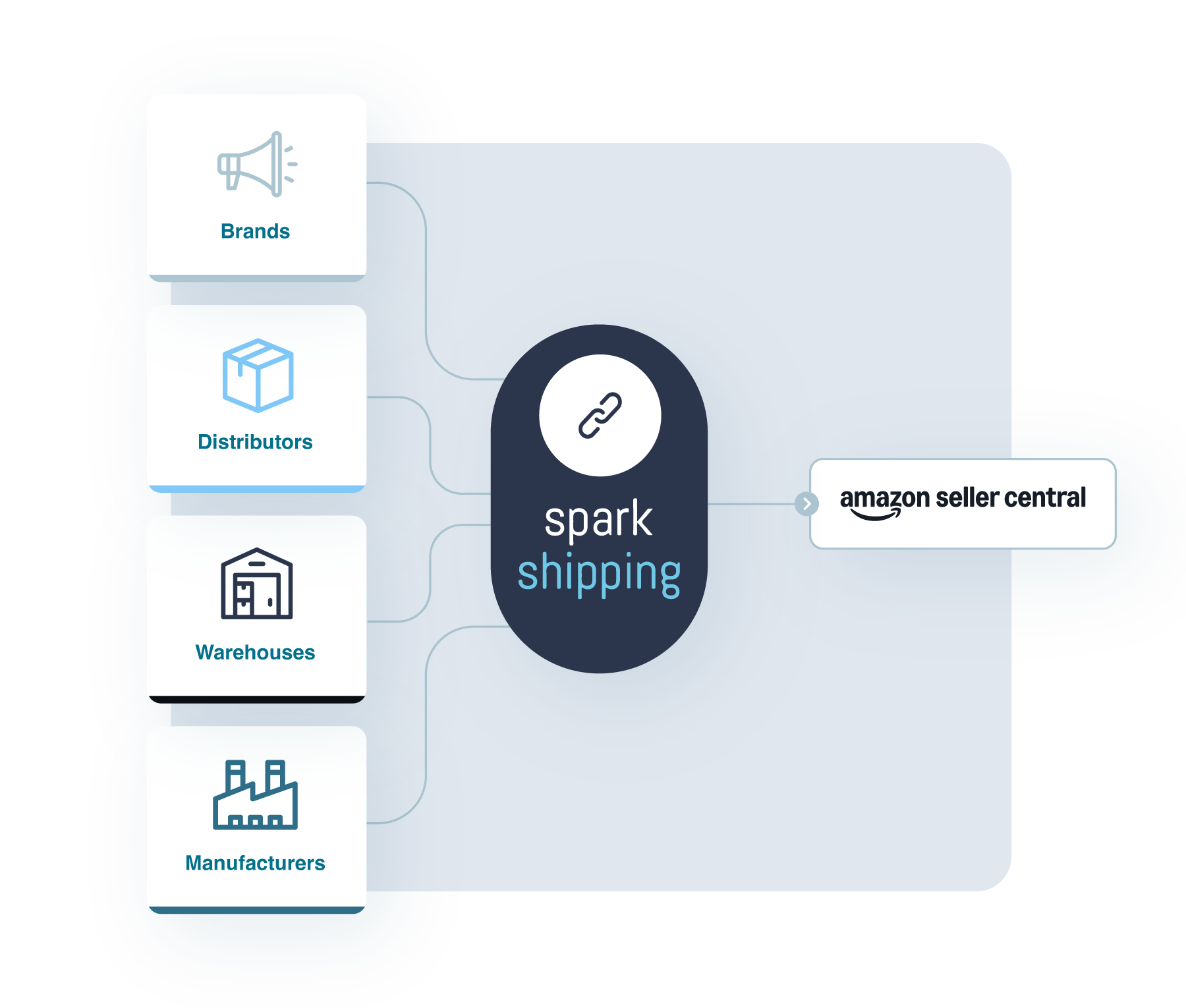
Connect Amazon Seller Central to your suppliers, your own warehouse, or both with Spark Shipping. Import supplier products, keep stock and prices aligned, and automate supported order routing and shipment tracking.
Expand your catalog and handle fulfillment with less manual work.

Trusted by Ecommerce Businesses

Selling on Amazon Takes Too Much Manual Work
Every supplier brings product information, stock levels, prices and order processes that need to work with your Amazon account. As you add products and suppliers, your team has more to keep aligned.
Preparing products for sale
Adding supplier products and matching them to existing Amazon listings takes time, especially across large catalogs.
Keeping stock information current
A supplier sells out, but your Amazon listing still shows the product as available.
Responding to cost changes
A supplier raises its price, and your team needs to adjust your selling price to account for the increase.
Processing orders and tracking
Someone has to send each order to the right supplier, then retrieve and upload tracking when it ships.
Spark Shipping connects these processes, helping you expand your catalog and handle daily orders with less manual work.
How Spark Shipping Connects Amazon with Your Suppliers
Connect supplier catalogs and warehouse stock to Amazon Seller Central. Choose products and configure inventory, pricing and order-routing rules for the connections you want to use.
1-Click Product Importing
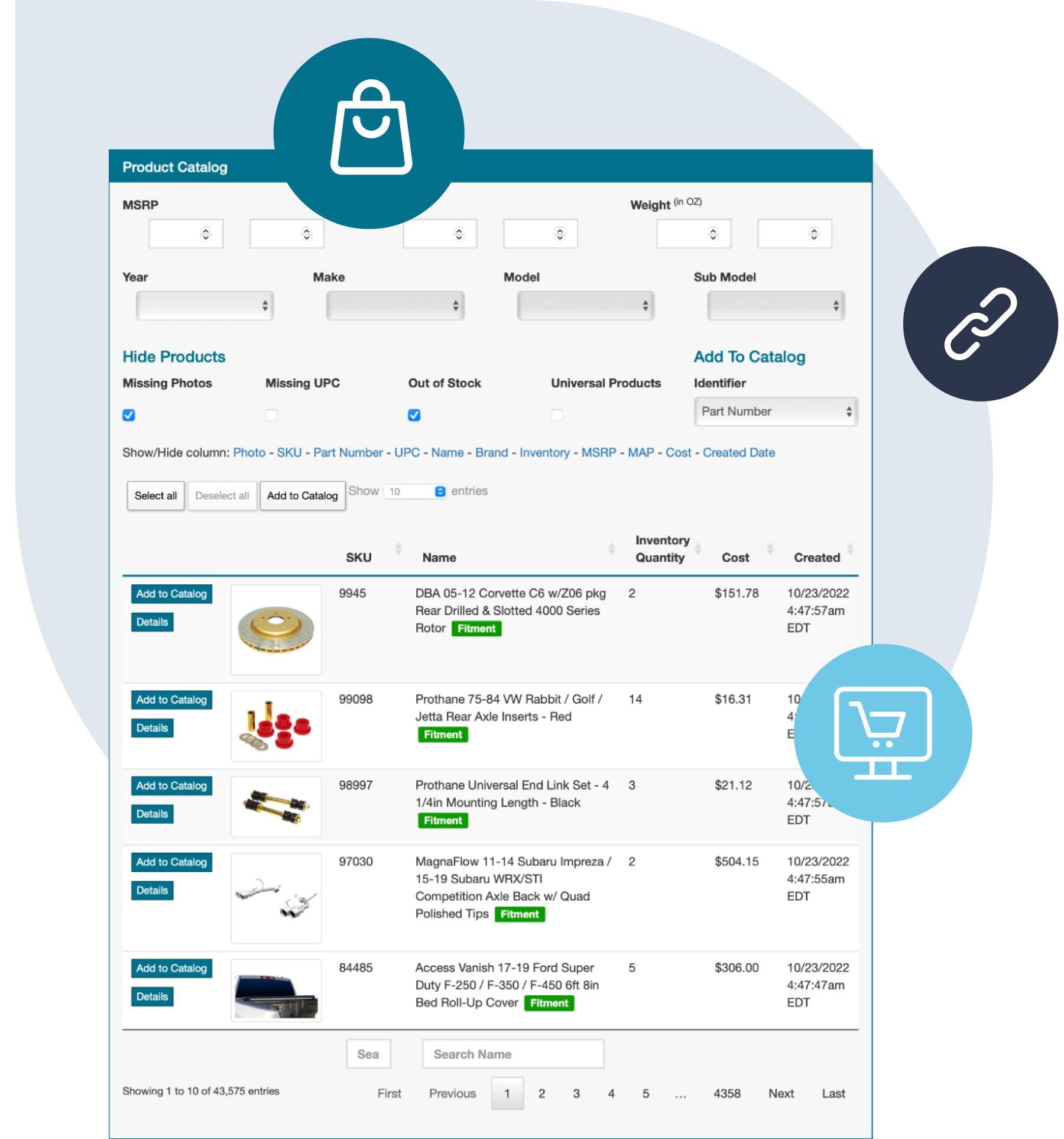
Select supplier products, match them to Amazon’s existing catalog and link your listings to the right supplier records.
Keep Inventory and Pricing Updated
With inventory and pricing updates enabled, Spark Shipping applies your rules to connected stock and cost data, then updates matched Amazon listings.
Send Orders to Suppliers
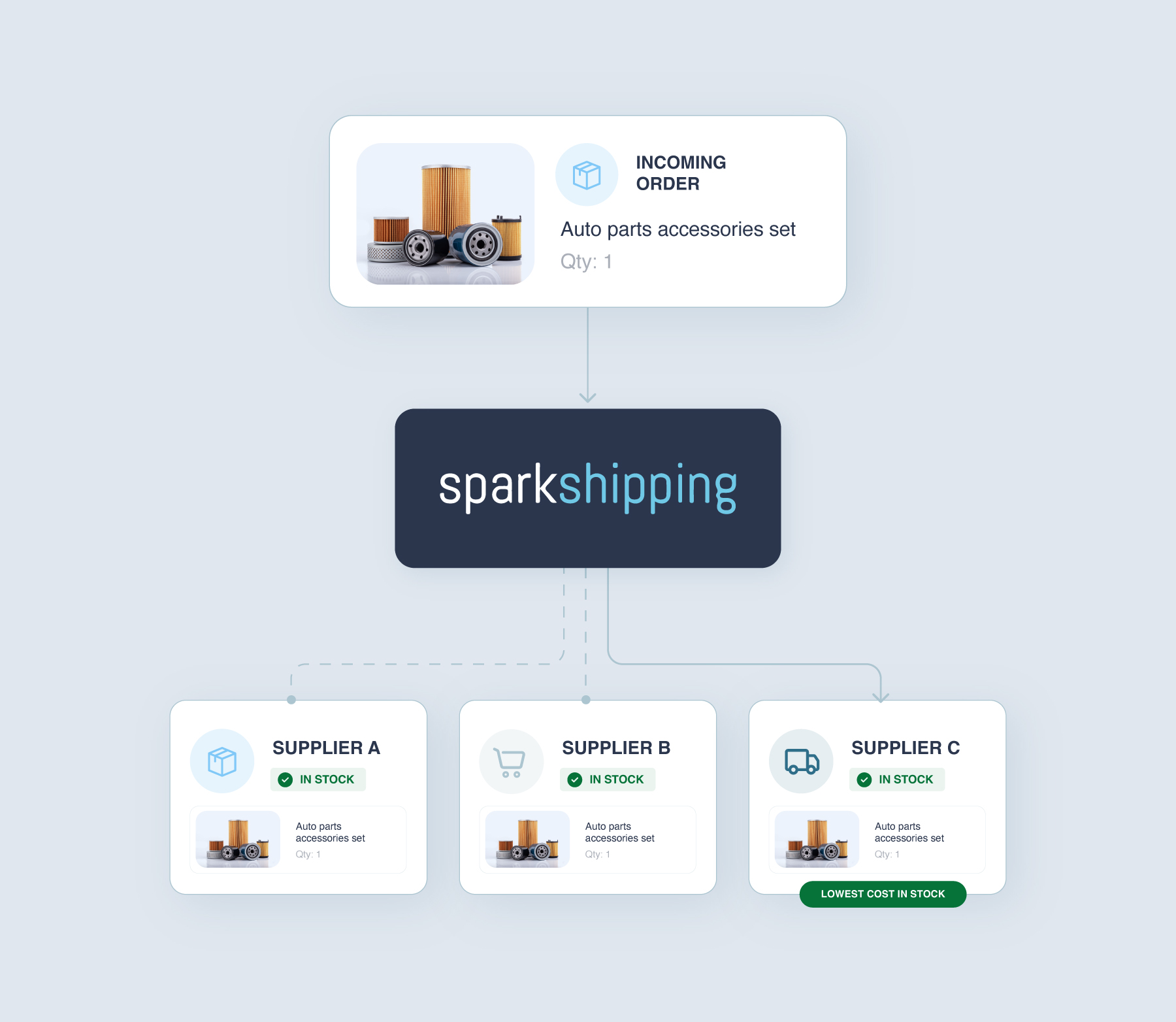
With automatic submission enabled, assigned Amazon order items go to connected suppliers or your warehouse under your routing rules.
Return Tracking to Amazon
When a connected supplier or warehouse provides tracking, Spark Shipping sends it to the matching Amazon order.

Inventory & pricing updatesKeep Amazon Stock and Prices Up to Date
Supplier stock and costs can change across hundreds or thousands of products.
Spark Shipping matches supplier and warehouse records to your Amazon listings. With inventory and pricing updates enabled, it applies your quantity settings and pricing rules to incoming stock and cost data, then sends those updates to Amazon.
Use stock buffers and thresholds to control availability. Update timing depends on supplier feeds and connected systems; stock can still change between updates.
Route Amazon Orders to the Right Supplier Automatically
Link one Amazon listing to several suppliers, keeping each supplier’s product code (SKU), cost and stock separate. A lowest-cost rule compares the configured costs of suppliers with enough stock.
With supported ordering connections and automatic submission enabled, Spark Shipping routes assigned Amazon order items under your rules. Orders with products from different suppliers can be split into line items; selected orders can be held for manual approval.
When a supplier returns tracking, Spark Shipping sends it to the matching Amazon order.
Expand Your Amazon Catalog with 1-Click Product Importing
Browse your connected suppliers’ catalogs, select the products you want to sell and add them to existing Amazon listings with 1-Click Product Importing.
Spark Shipping uses supplier UPCs to find existing ASINs, Amazon’s product identifiers. If automatic ASIN assignment is enabled, Spark Shipping can use a single returned match. You choose the ASIN when several matches are returned.
Review the exact product, variation and pack size before publishing. Products without an existing ASIN need Amazon’s separate new-product listing process.
What Our Customers Have to Say
-
"Choosing Spark Shipping was a game-changer... What stood out was their range of pre-existing integrations and their openness to new ones—it never took more than 30 days. This quick integration is quite exceptional in the industry."Paul Andrew, CEORead Full Case Study -

"Spark Shipping has made my business pretty much run on autopilot... The orders come in, get processed, sent to my suppliers, and the tracking is sent back. I never have to worry about inventory levels.Burt WheelerRead Full Case Study -

"The most appealing part was the ability to automate all of my dropship orders. Their help has resulted in a dramatic decrease in the human labor needed to keep our order flow going."Sam FineRead Full Case Study -

"We were looking for a company that could do custom API integrations with our dropshippers... Spark Shipping automated and simplified the flow of order, tracking, and inventory data, saving staff hours."Read Full Case Study
Connect Your Suppliers or Add New Ones
Connect suppliers you already work with, or explore Spark Shipping’s library of 150+ prebuilt integrations. Choose suppliers that permit Amazon sales and can meet your fulfillment commitments.
Spark Shipping supports supplier connections using APIs, EDI, CSV and XML files, FTP/SFTP and email. Available inventory, ordering and tracking tasks depend on what each connection supports.
If a supplier is not already listed, our team can assess their data and order requirements and help arrange the connection. Custom integration options and setup costs depend on the supplier and your plan.
Get Help Setting Up Your Amazon Integration
Start with your Amazon Seller Central account and the suppliers or warehouse you want to connect. Spark Shipping offers onboarding and training to help configure your setup, with support options depending on your plan.
1. Connect your account and stock sources
Authorize your Amazon account and provide the access needed for each supplier or warehouse connection.
2. Set up your products and rules
Import or link products, review ASIN matches and configure inventory, pricing and order rules.
3. Review your setup
Review product matches, handling times and shipping methods. Confirm ship-from details and tracking before enabling updates and automatic order submission.
Amazon Integration FAQs
How do I connect my suppliers to Amazon?
Connect your Amazon Seller Central account and the suppliers or warehouse you want to use. You need access to the stock data, product records and supported ordering and tracking methods required for your chosen automations.
You can have a developer build and maintain those connections, or use Spark Shipping’s ready-made integrations and custom connection options to bring inventory, pricing, orders and tracking into one workflow. This reduces repeated updates and order entry.
To get started, authorize your Amazon account, connect your suppliers or warehouse, and add products or match existing listings. Configure your inventory, pricing and order preferences before enabling the automations you want to use.
See the Amazon integration guide.
Can I connect my existing Amazon listings to my suppliers?
Yes. You can keep your existing Amazon listings and connect them to the products your suppliers carry.
Match each Amazon listing to the correct supplier product in Spark Shipping. That relationship tells the system which stock and cost data belong to the listing and which supplier can fulfill its orders.
Once the matches and automation settings are in place, you can automate inventory and price updates and route assigned orders without recreating your catalog.
How do I add supplier products to Amazon and match them to ASINs?
Start with a connected supplier’s catalog and choose the products you want to sell. Spark Shipping offers one-click product importing and uses supplier UPCs to look for matching products in Amazon’s existing catalog.
With automatic ASIN assignment enabled, the software can assign an ASIN when the search returns a single match. If several ASINs are returned, you choose the correct one. Review the exact product, variation and pack size before publishing so the Amazon listing represents the item you will supply. See the Amazon ASIN matching guide.
This matching workflow uses existing ASINs. Products without an existing ASIN need Amazon’s separate new-product listing process.
How do I keep Amazon inventory aligned with supplier stock?
Inventory syncing connects your suppliers’ stock data to the matching Amazon listings. As supplier quantities change, Spark Shipping applies your inventory settings and sends updates to Amazon, saving you from checking feeds and editing quantities manually.
You can use stock buffers and thresholds to limit the quantities offered for sale and reduce overselling risk.
Update timing depends on how often the supplier provides fresh data, the volume being processed and the limits of the connected systems. Automation reduces the gap between supplier availability and your listings, but stock can still change between updates.
How do I automate Amazon price updates when supplier costs change?
Automatic price updates need current supplier costs, correct product matches and pricing rules for your Amazon listings. With pricing automation enabled, Spark Shipping receives cost changes, calculates selling prices using your rules and sends the updates to Amazon.
You can use percentage or fixed markups and different rules for products in different cost ranges. Allow for Amazon selling fees, supplier charges and shipping when choosing those rules.
Where your supplier provides minimum advertised price (MAP) data, you can apply MAP settings alongside pricing automation. This reduces repeated calculations and manual price edits as supplier costs change.
See the pricing automation guide.
How do I send Amazon orders to dropship suppliers automatically?
Your Amazon listings need to be matched to supplier products, with a supported ordering connection and permission to submit live orders through your supplier account. This gives the integration the product and account details required to place the right supplier order.
With automatic order submission enabled, Spark Shipping receives Amazon orders and sends the assigned items to suppliers according to your routing rules. Your team avoids entering the same order again in a supplier portal or preparing a separate purchase order manually.
You can also flag selected orders for manual approval when you want to review them before submission.
How do supplier tracking numbers get back to Amazon?
Tracking updates follow the shipment back from the supplier to the Amazon order. Once your supplier ships and makes tracking available through the connected workflow, Spark Shipping retrieves those details and sends them to the matching order in Amazon Seller Central.
This saves your team from looking up shipments and copying tracking numbers into Amazon manually.
See tracking automation and the Amazon integration guide.
Can I connect several suppliers to the same Amazon listing?
Yes. Spark Shipping can link several suppliers that carry the same product to one Amazon listing, while keeping each supplier’s SKU, cost and stock quantity associated with that product.
You can use routing preferences such as available stock, cost or supplier priority to determine which source receives an order. For a lowest-cost rule, Spark Shipping compares the configured costs of suppliers with enough stock.
This gives you more sourcing options and reduces the work of checking suppliers and deciding where to place each order.
See the order routing guide.
Can I fulfill Amazon orders from my own warehouse as well as dropship suppliers?
Yes. Your own warehouse can act as an inventory and fulfillment source alongside your dropship suppliers.
Connect the warehouse’s stock data and supported order and tracking methods, match the products it holds, and set your fulfillment preferences. Spark Shipping can then route order items to your own shipping team or an external supplier according to those rules.
You can keep selected products on hand while using suppliers for the rest of your catalog, with stock, orders and tracking connected to the same Amazon operation.
See how to connect inventory and fulfillment sources. For stock held in Amazon’s fulfillment network, see the separate FBA-as-a-vendor guide.
Can Spark Shipping connect a supplier that is not already listed?
Yes. Spark Shipping offers custom supplier connections as well as prebuilt integrations. Supported methods include APIs, EDI and file feeds such as CSV or XML, so your suppliers do not all need to use the same system.
The team can assess how your supplier shares product data and stock, receives orders and returns tracking, then identify the connection work needed for your chosen automations.
Share the supplier’s technical information when discussing your setup. Available workflows, setup costs and plan requirements depend on that connection.
Explore supplier integration options.
What help is available when setting up Spark Shipping for Amazon?
Spark Shipping offers onboarding, training and product support to help you configure your Amazon and supplier workflows. The available onboarding and support options depend on your plan.
You provide the required account access, review product matches and choose how inventory, prices and orders should be handled. The team can explain the software, guide you through setup questions and help troubleshoot technical issues.
Setup time depends on the connections and catalog work involved, including any custom integration or manual ASIN selection.
See plans and onboarding options and what to expect during setup.
Which Amazon marketplaces does Spark Shipping support?
Spark Shipping’s Amazon Appstore listing shows support for the US, Canada, Mexico, the UK, Germany, France, Spain, Italy, the Netherlands and Turkey.
If you sell in another marketplace, contact the team to confirm availability and discuss the supplier and fulfillment workflows you need.
What should I check before using dropship suppliers for Amazon orders?
Confirm that your supplier permits sales of the products on Amazon and can fulfill orders in line with Amazon’s dropshipping requirements. Agree how shipments will identify you as the seller of record, meet the packaging and documentation rules, and support your customer-service and returns responsibilities.
Spark Shipping can automate the movement of inventory, orders and tracking between connected systems. You and your supplier still need an arrangement that meets Amazon’s requirements.
Review Amazon’s dropshipping guidance.
See How Spark Shipping Can Work for Your Amazon Business
Tell us which suppliers or warehouse you want to connect, which products you want to add and how you manage Amazon orders. We’ll show you how Spark Shipping can connect your setup and reduce manual work.